Tip !

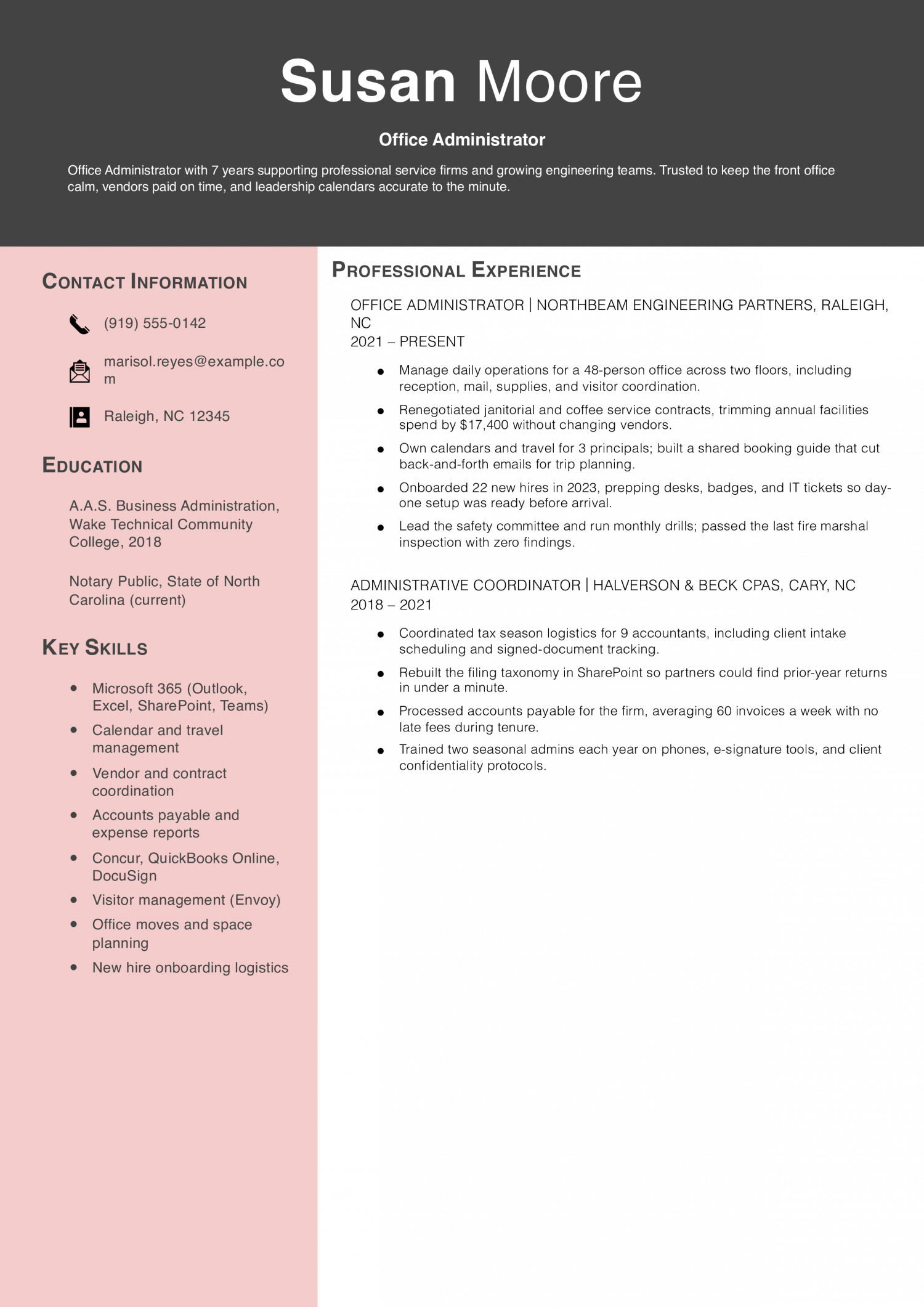
The office administrator resumes that get scheduled for interviews share three things: a stack list in the top third, headcount and budget numbers attached to every role, and one named process fix per job with a time or dollar result.

Andrew Stoner , Executive Resume Writer and Career Coach

Why this resume works

  • Saved real money on vendor contracts: A specific $17,400 reduction shows the admin can negotiate, not just process paperwork.
  • Numbers tied to daily work: Headcount, invoice volume, and onboarding counts give a clear picture of the office’s size and pace.
  • Grew into more responsibility: The move from Coordinator at a CPA firm to Administrator at an engineering firm shows a real promotion path.

Entry Level Example

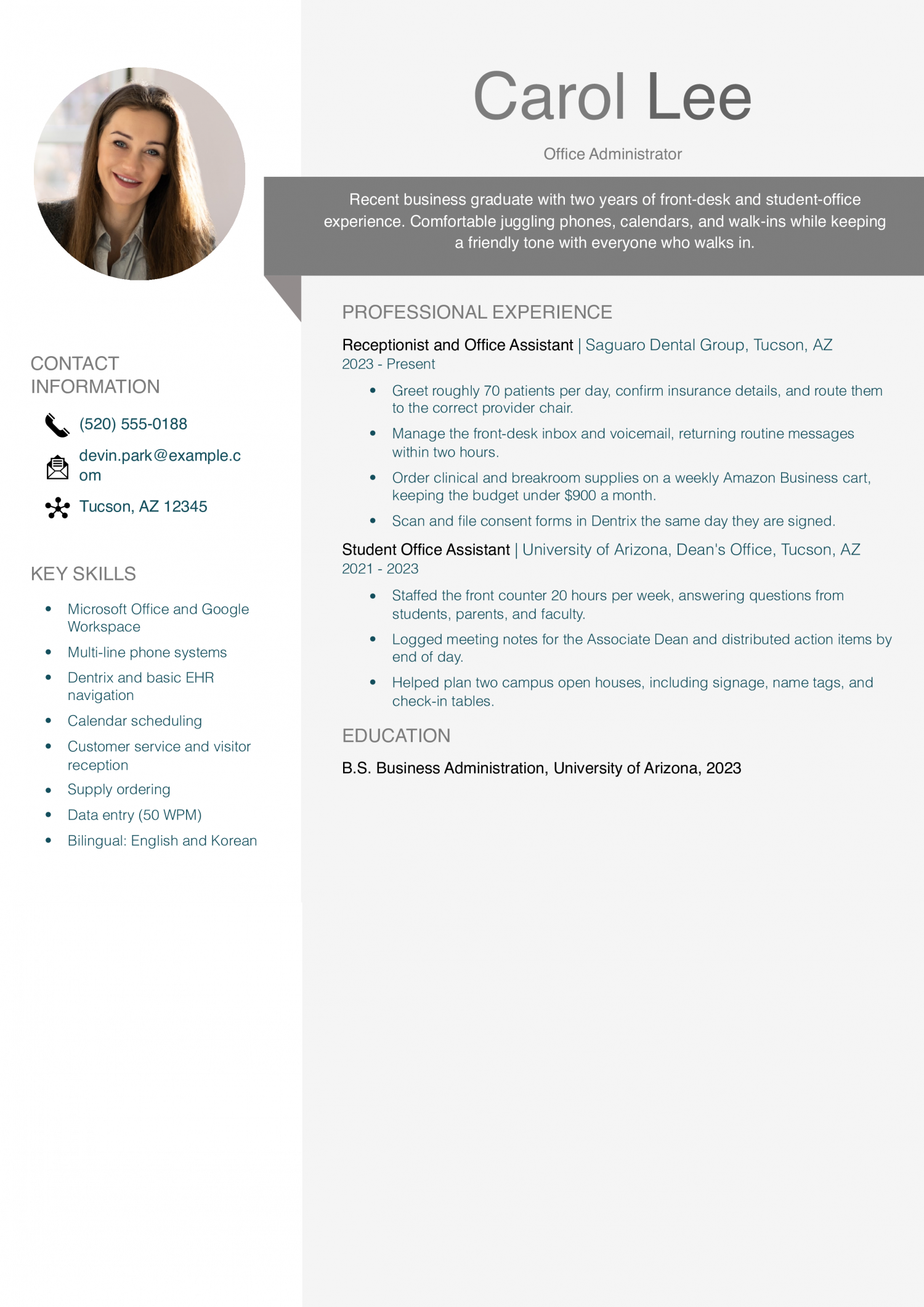
Entry-level office administrators come from receptionist, coordinator, or admin assistant work and need to prove they can run a calendar, a vendor list, and a filing system without supervision. The resume should lead with software fluency, headcount supported, and one process you tightened.

Why this resume works

  • Real numbers from a first job: Daily patient counts and a monthly supply budget show the candidate handled steady, measurable work.
  • Shows two settings of office work: A dental front desk plus a university dean’s office covers both clinical and academic admin styles.
  • Includes a useful second language: Korean fluency is a concrete skill that employers can match to specific patients or clients.

Experienced Example

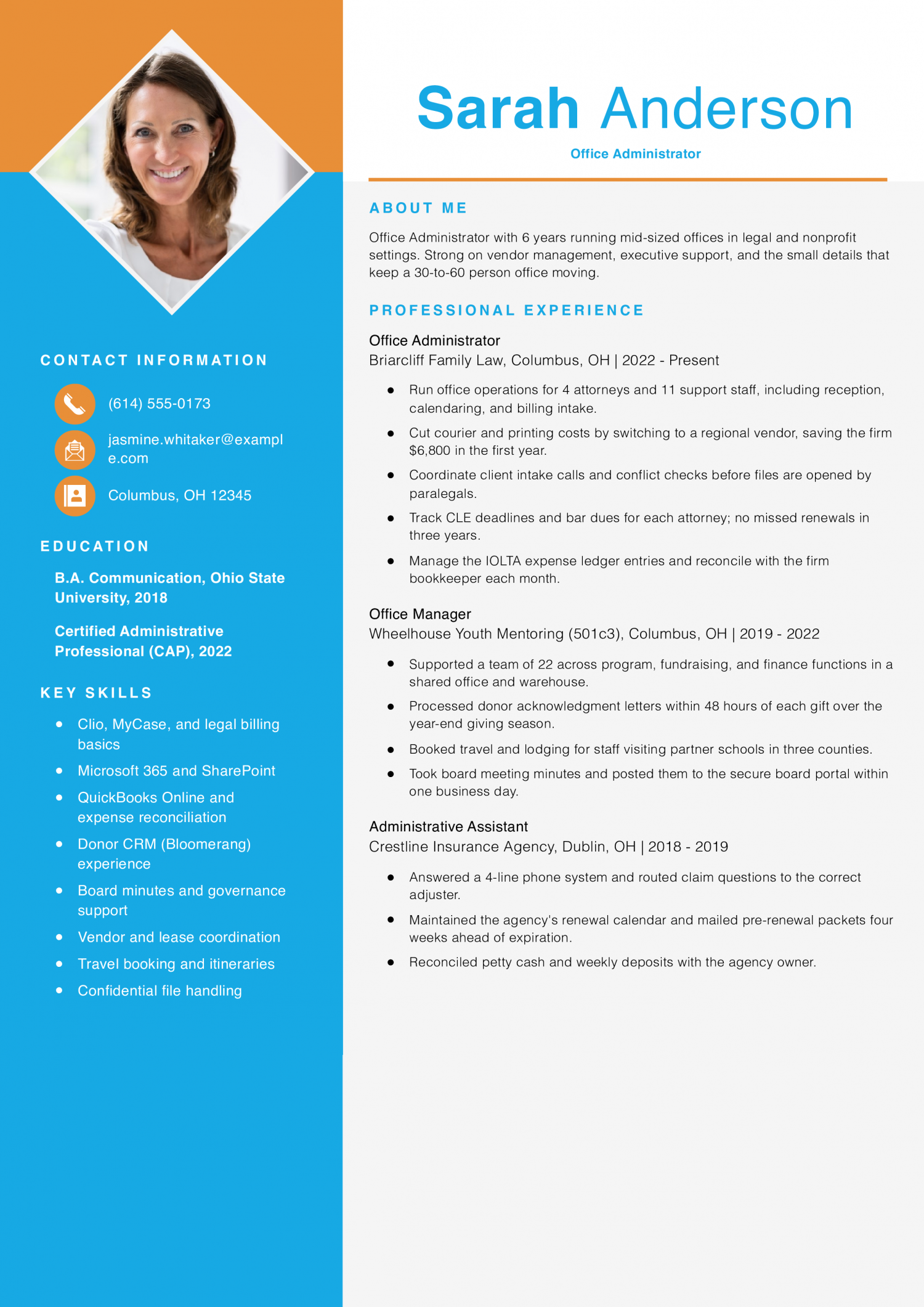
Experienced office administrators run daily operations for a team or department and own vendor contracts, expense reporting, and onboarding logistics. The resume needs to show budget or invoice scope, the stack you run, and quantified time or cost savings from process fixes.

Why this resume works

  • Saved the firm money with a vendor switch: A specific $6,800 savings makes the candidate’s negotiation impact concrete.
  • Handles industry-specific compliance: Tracking CLEs, bar dues, and IOLTA entries shows real legal-office knowledge, not just general admin.
  • Covers three different office types: Law firm, nonprofit, and insurance agency experience suggests the candidate can adapt to a new setting.

Senior Example

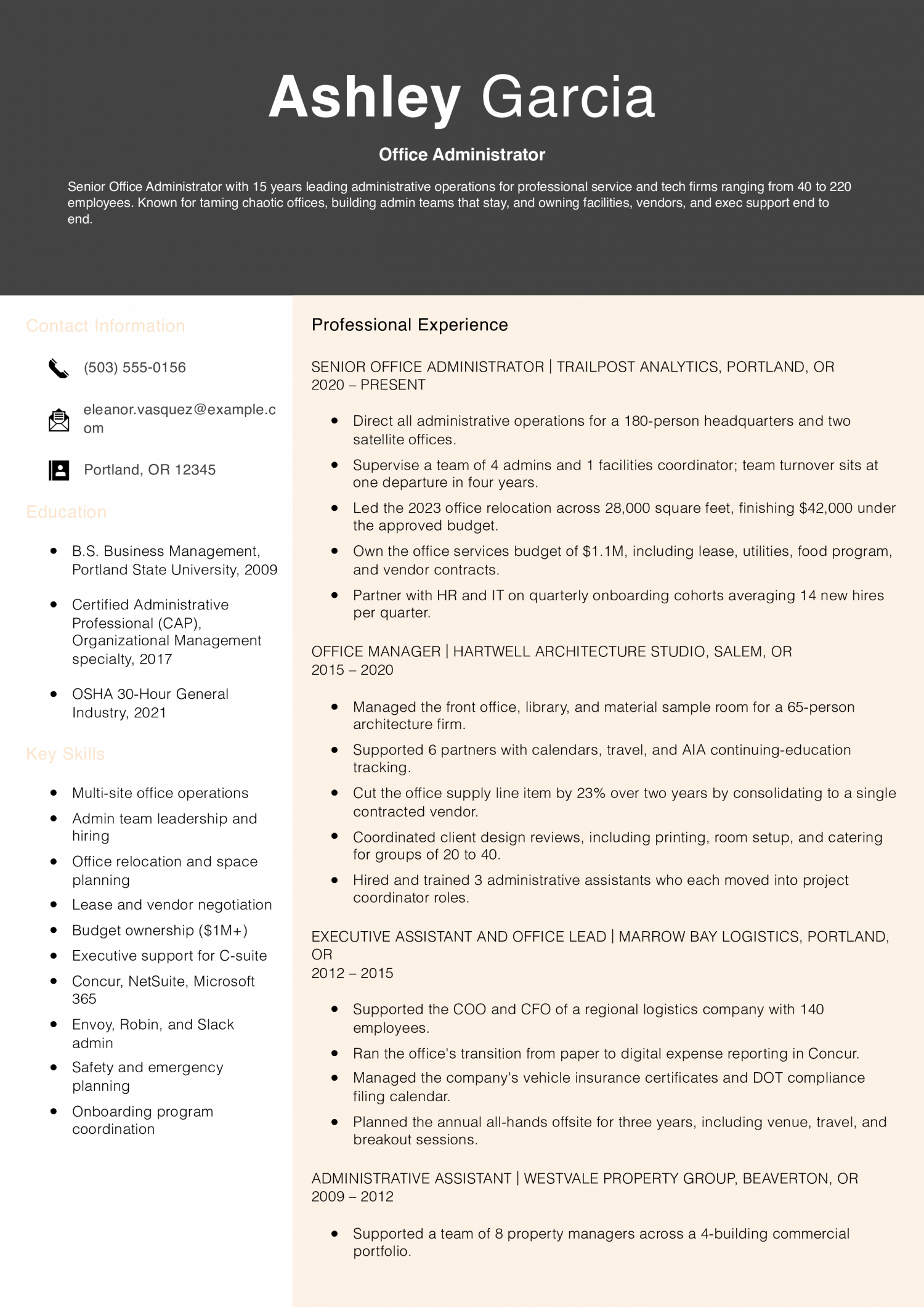
Senior office administrators and office managers run multi-site operations, supervise admin staff, and own facilities, IT coordination, and budget lines. The resume should lead with people managed, total operating budget, and the policies or systems you built from scratch.

Why this resume works

  • Owns a large budget: A $1.1M office services budget signals real financial accountability, not just supply orders.
  • Led a major office move under budget: Coming in $42,000 under on a 28,000-square-foot relocation is the kind of project senior admins are hired to run.
  • Built and kept an admin team: One departure in four years across a team of five is a concrete sign of strong management.

How to Write an Office Administrator Resume

01 Open with the metric an operations director would use to size you up

The first line of your summary should name the headcount you support, the operating budget or invoice volume you handle, and the software stack you run.

Operations directors and office managers read that opener as your readiness to take the keys on day one. A summary that opens with ‘detail-oriented administrator’ tells them nothing about scope and gets skipped.

Lead with numbers: ’45-person office, $1.2M annual operating budget, MS 365 and QuickBooks.’ That single line answers the three questions every screener asks before they read your bullets.

02 Quantify the scope behind every bullet

Bullets without a number tend to read as duties, not accomplishments. Most strong office administrator resumes attach scope to every line: calendars managed, vendors coordinated, invoices processed, expense reports approved.

Name two or three realistic metrics per role. Examples: ‘Managed calendars for 12 executives across three time zones,’ ‘Processed 240 invoices monthly through QuickBooks with 99% accuracy,’ ‘Coordinated 18 vendor contracts totaling $480K annually.’

When the work resists a hard number, use volume language: weekly meeting cadence, monthly board packets prepared, quarterly audits supported. The point is showing the reader the size of the room you ran.

03 Group your work into operations categories

Office administrator bullets sprawl if you list them in random order. Cluster them under four buckets: office operations and facilities, calendar and correspondence, vendor and budget management, and onboarding and HR support.

Within each cluster, lead with the highest-scope bullet. Under vendor and budget management, your contract negotiation work comes before your supply ordering.

This grouping helps a recruiter scan for the bucket their posting emphasizes. A medical practice screens for patient scheduling and HIPAA workflows; a law firm screens for billing coordination and client intake.

04 Place software, certifications, and tools where they get scanned

Put a ‘Technical Skills’ block in the top third of page one, right under the summary. List MS Office 365, Google Workspace, QuickBooks, your scheduling tool (Calendly, Acuity), and any ERP or HRIS you’ve touched (NetSuite, ADP, BambooHR).

Operations directors need the stack visible early because they are matching you against the tools their office already runs. Burying it on page two costs you the ATS keyword match.

If you hold a Certified Administrative Professional (CAP) credential or a Microsoft certification, put it in a credentials line under your name. Year of completion only; no certification numbers on the resume.

05 Close with education and any specialized training

Education sits at the bottom for office administrators with two or more years of experience. Name the degree, the school, and the graduation year if it falls inside the last 10.

Add a short ‘Professional Development’ line for any QuickBooks ProAdvisor training, notary commission, HIPAA compliance training, or OSHA recordkeeping courses you’ve completed.

Skip the hobbies section and the references line. Use that page-two real estate for one more quantified bullet from your most relevant role.

Five years ago, an office administrator resume read like a duties list copied from the job description. The skills below come from the resumes our users built in 2026, and the mix has shifted toward named software, budget scope, and process-improvement vocabulary. Operations directors and office managers weigh hard skills first because they map to the tools their office already runs.

Soft skills only count when a bullet later in the resume proves them. Match the hard skills below against your target posting, then treat the soft skills as evidence tags you back up in your bullets.

Soft Skills % of resumes with this skill
Communication 76%
Organization 65%
Time management 44%
Attention to detail 37%
Problem-solving 29%

And here are the top hard skills showing up most often.

Hard Skills % of resumes with this skill
Microsoft Office Suite 65%
Data entry 54%
Calendar scheduling 41%
Records management 35%
Bookkeeping 27%

Based on data from thousands of office administrators’ resumes built on ResumeTemplates.com, May 2026.

Must Have on an Office Administrator Resume

The items below are what separate an office administrator resume from one that gets put back in the pile.


AI Skills to Add

AI use on an office administrator resume can go three ways: lead with ‘AI-powered admin’ (which operations directors screen out), leave it off entirely (which reads as out of step in 2026), or describe the workflow as it actually runs in your office. The third is what office managers can validate in an interview.

What AI is actually changing for this role
Drafting and correspondence

Copilot and ChatGPT now handle first drafts of memos, vendor emails, and meeting agendas, with you editing for tone and accuracy.

Scheduling and triage

Outlook and Calendly AI features propose meeting times and flag conflicts, so you spend less time on calendar tetris.

Expense and invoice coding

QuickBooks and Concur use AI to suggest GL codes and flag duplicate invoices, shifting your role to review and exceptions.

Knowledge and SOP retrieval

Notion AI and SharePoint Copilot surface vendor contacts, policies, and past meeting notes faster than manual filing searches.

AI tools to name
  • Microsoft 365 Copilot: Drafting meeting summaries, formatting Excel trackers, and pulling action items out of Teams calls.
  • ChatGPT or Notion AI: Drafting vendor correspondence, rewriting SOPs, and summarizing long policy documents for executive review.
How to phrase AI on your resume
Do
  • Used Microsoft 365 Copilot to draft weekly executive summaries, cutting prep time from 90 minutes to 25.
  • Built Notion AI workflows for vendor SOP retrieval, reducing onboarding ramp for new admin staff by two weeks.
Skip
  • AI-powered office administrator with a passion for next-generation productivity.
  • Leveraged cutting-edge AI to revolutionize daily office operations.

Office Administration Credentials That Get You the Job

Operations directors read the certifications list as a map of where your administrative work is heading. The list below tells them whether you’ve invested in financial workflows, executive support, compliance, or project coordination. List the issuing body and the year of completion on one line under your name or in a dedicated Certifications block.

  • Certified Administrative Professional (CAP): Issued by IAAP; signals a broad operations and management skill set and is the most recognized credential for senior office administrators.
  • Microsoft Office Specialist (MOS) Expert: Validates advanced Excel and Word skills; useful when the posting names financial tracking or document production as core duties.
  • QuickBooks ProAdvisor Certification: Signals you can own AP, AR, and bank reconciliation in QuickBooks, which matters for small-office and startup administrator roles.
  • Notary Public Commission: Low-cost credential that adds value at law firms, real estate offices, and medical practices where document witnessing is routine.

Latest BLS Statistics for Office Administrators

For office administrators, the spread between the 10th-percentile floor and the top-decile ceiling tells you that scope, supervisory load, and industry move pay more than tenure. A two-person front desk pays one band; running operations for a 60-person professional services office pays another. Geography compounds the spread, with metropolitan legal, finance, and tech hubs paying well above national medians.

Lead your resume with the headcount you support, the operating budget you touch, and the industry vocabulary that maps you to the ceiling.

$43,630 National median annual
$45,470 National mean annual
$29,120 Entry-tier floor (10th percentile)
$63,840 Top-decile ceiling (90th percentile)
2,510,550 Office Administrators in the U.S.
Where you stand

Entry tier

$29,120 to $43,630 At the entry tier, lead with the software stack you run, the headcount you support, and any reception, scheduling, or coordinator experience.

Mid band

$43,630 to $63,840 At the mid band, your resume needs to show vendor contracts owned, invoice or budget volume, and one or two named process fixes with results.

Top decile

$63,840+ At the top decile, lead with admin staff supervised, total operating budget, multi-site scope, and any facilities or HR systems you built.

Top-paying states

# State Avg. Annual
1 Colorado $56,150
2 District of Columbia $53,110
3 Alaska $51,400
4 Washington $49,920
5 North Dakota $48,900
6 Massachusetts $48,890
7 New Hampshire $48,510
8 Oregon $48,360
9 New Jersey $47,980
10 California $47,920

Highest-employment states

# State Workers Median
1 California 306,000 $47,920
2 Texas 200,960 $37,500
3 Florida 191,350 $42,720
4 New York 133,060 $44,620
5 Pennsylvania 118,680 $43,600
Source: U.S. Bureau of Labor Statistics, OEWS 2024 release (SOC 43-9061).
Written by professional resume writers and loved by hiring managers

Resume Templates offers HR approved resume templates to help you create a professional resume in minutes. Choose from several template options and even pre-populate a resume from your profile.

Frequently Asked Questions

What resume format works best for an office administrator?

Use a reverse-chronological format with a technical skills block in the top third of page one. Operations directors scan for the software stack before they read your bullets, so it has to be visible above the fold.

Save functional or skills-only formats for cases where you have a clear employment gap, and even then add a short experience section underneath.

How do I list Microsoft Office on an office administrator resume?

Name the specific applications, not just 'Microsoft Office.' Write 'Microsoft Office 365 (Outlook, Excel, Word, Teams, SharePoint)' so the ATS matches each tool and the recruiter sees the depth.

If you hold a Microsoft Office Specialist credential, add it to your Certifications line with the year. Skip self-rated proficiency labels like 'expert' or 'advanced' since reviewers discount them.

How long should an office administrator resume be?

One page for under 10 years of experience; two pages once you've managed staff or run multi-site operations.

Senior office managers with budget ownership and supervisory scope earn the second page by filling it with quantified bullets, not duties. Anything longer reads as padding.

How do I move from administrative assistant to office administrator on my resume?

Rewrite your bullets around ownership, not support. Instead of 'assisted with vendor management,' write 'managed eight vendor contracts totaling $180K annually.'

Pull out any work where you ran a process end to end (onboarding, expense reporting, office moves) and lead with it.

Add a one-line summary that names the headcount you supported and the budget or invoice volume you touched, so the reader sees operator scope at the top.

What resume template should an office administrator use?

For an office administrator, a professional template is the safest pick, because it signals the polish hiring managers in this field expect. An ATS-friendly template is a solid alternative. Whichever you choose, keep the formatting clean and easy to parse: clear section headings, a standard font, and no graphics a parser can choke on.

Rate this article

Office Administrator Resume

Average Rating

4.5/5 stars with 104 reviews

You have given 0 Star(s)
4.5/5 stars with 104 reviews
Andrew Stoner

Executive Resume Writer and Career Coach

Andrew Stoner is an executive career coach and resume writer with 17 years of experience as a hiring manager and operations leader at two Fortune 500 Financial Services companies, and as the career services director at two major university business schools.