Tip !

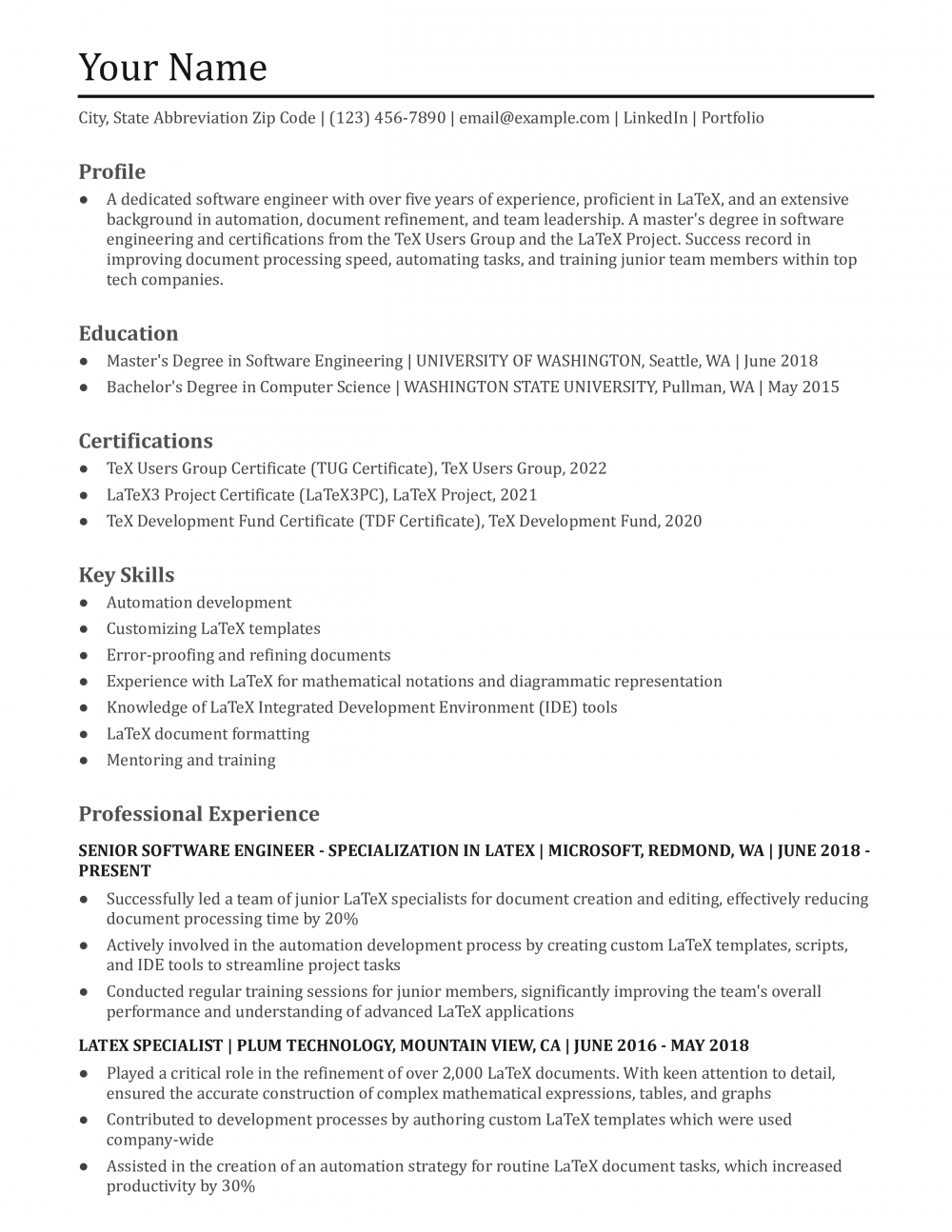
The LaTeX resumes that advance share three things: a single-column layout that copies cleanly into plain text, contact info as real text instead of FontAwesome glyphs, and section headings a parser recognizes within seconds.

Andrew Stoner , Executive Resume Writer and Career Coach

Why this resume works

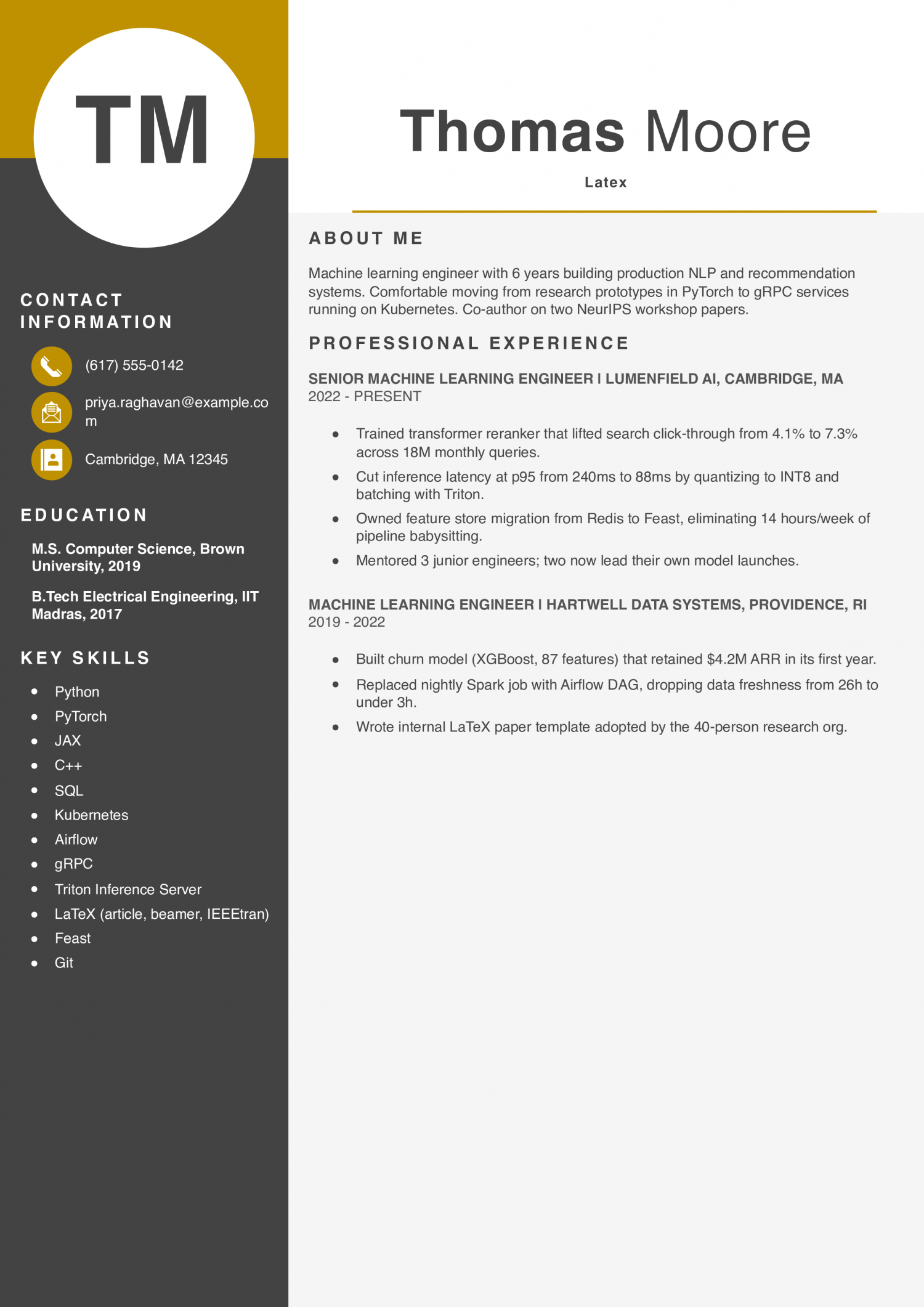
  • Numbers tied to revenue: The churn-model bullet pairs a concrete dollar figure with the model details, which is exactly what hiring managers scan for.
  • Latency improvement is specific: Going from 240ms to 88ms p95 with the actual technique (INT8 quantization, Triton) shows the candidate did the work, not just attended the meetings.
  • LaTeX use is shown, not claimed: Building the internal LaTeX template adopted by 40 people is a stronger signal than listing ‘LaTeX’ alone in skills.

LaTeX Resume Example

This template fits engineers, researchers, and graduate students who want a single-column LaTeX resume that exports clean PDF text. The resume needs to prove technical depth without leaning on icons, columns, or custom glyphs that break ATS parsing.

Why this resume works

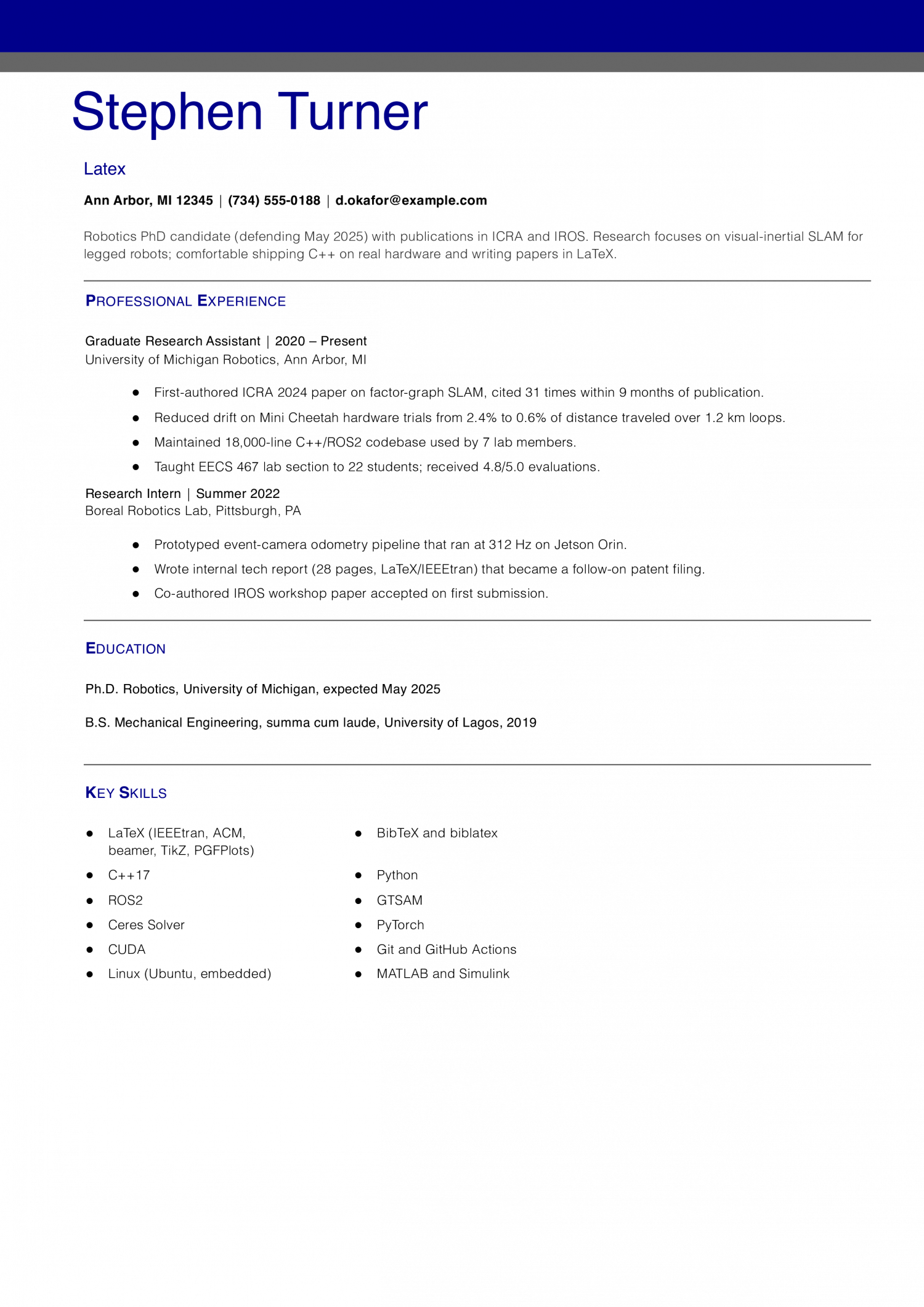
  • Citation count is concrete: 31 citations in 9 months is the kind of number reviewers actually weigh; vague phrases like ‘well-received paper’ would not land the same way.
  • Hardware results, not just simulation: Drift dropping from 2.4% to 0.6% on real Mini Cheetah trials shows the work survived contact with the physical world.
  • Teaching shows communication skill: A 4.8/5.0 rating with 22 students gives hiring managers evidence the candidate can explain hard ideas, which matters for any research role.

How to Write a LaTeX Resume

01 Understand what a LaTeX resume is

A LaTeX resume is a resume you write as source code and compile into a PDF. The source is a .tex file with commands like \section{} and \item, and the output is a typeset document with stable spacing and fonts.

People pick LaTeX for two reasons: consistent typography across edits and a source file they can version in Git. The honest tradeoff is a learning curve and slower edits compared to Word.

Recruiters only see the exported PDF, so LaTeX is a workflow choice, not a hiring signal. Pick it because it fits how you work, not to score points.

02 Start in Overleaf with a proven template

The fastest way to start is Overleaf, a browser-based LaTeX editor with no install. Search the template gallery for Jake’s Resume, a widely used single-column template that exports clean PDF text.

Deedy is a two-column template and tends to confuse some ATS parsers, so prefer single-column for active job applications. Moderncv is another option if you want a more European CV look.

One catch with Jake’s Resume: it ships with FontAwesome icons for phone, email, and LinkedIn. Replace those icon commands with plain text labels, since some parsers read the glyphs as empty boxes or skip them.

03 Keep the layout ATS-safe

Stick with single-column layout and a standard font like Latin Modern, Computer Modern, or a system serif. Avoid custom glyph packages, tables for layout, multi-column resume environments, and decorative section dividers.

Export a text-selectable PDF, not an image. Open the PDF, select all, and paste the text into a plain text editor.

Read it top to bottom. If sections appear out of order, words are missing letters, or ligatures like fi and ffi render as boxes, the parser will struggle and you should fix the source before applying.

04 Edit the sections people get stuck on

Put your contact line as plain text near the top: name, city and state, email, phone, and a LinkedIn URL spelled out. Skip the icons and skip clickable mailto links if the template buries them in commands.

Bullets use \item inside an itemize environment, and the bullet text runs until the next \item or the closing \end{itemize}. Keep each bullet to one or two lines on the rendered PDF.

For dates, use a consistent format like “Jun 2022 to Present” and right-align them with the template’s built-in command rather than tabs or spaces.

05 Convert from Word, or stay in Word

To move an existing resume into LaTeX, rebuild it section by section in your chosen template rather than running a converter. Paste the text, then re-apply structure with \section, \item, and the template’s date macros.

Going the other direction is harder. LaTeX-to-Word export through Pandoc or similar tools is lossy and rarely matches the PDF.

If an employer asks for a .docx file, send a Word version you maintain separately. Keep both files in sync, and treat the LaTeX source as the canonical copy for the PDF you submit elsewhere.

When to Use a LaTeX Resume

LaTeX is worth it when you want precise, consistent typography and a resume you can version and reproduce from source. It is common in software, engineering, data, and academia. Recruiters only ever see the exported PDF, not your source, so LaTeX is a workflow choice for you, not a hiring signal. Skip it if you need fast edits or the employer expects a Word file.

When to use this format
  • You work in a technical or academic field (software, engineering, data, research) where LaTeX is familiar
  • You want pixel-consistent formatting and clean typography that holds across edits
  • You are comfortable with markup, or will use a no-install editor like Overleaf
  • You want your resume kept under version control or rebuildable from source
When to skip it
  • You need to make fast edits or are not comfortable editing markup
  • The employer or application explicitly asks for a .docx file
  • You would lean on a multi-column or custom-font template that ATS parsers can mangle
  • A standard Word or Google Docs resume already covers what your field expects

Most people start from an existing template rather than a blank file. These are the LaTeX resume templates worth knowing, from the safest default to the more design-forward options.

  • Jake’s Resume: The most widely used LaTeX resume template, by Jake Gutierrez. Single-column, clean, and ATS-safe once you swap its FontAwesome contact icons for plain text. The best starting point for most people.
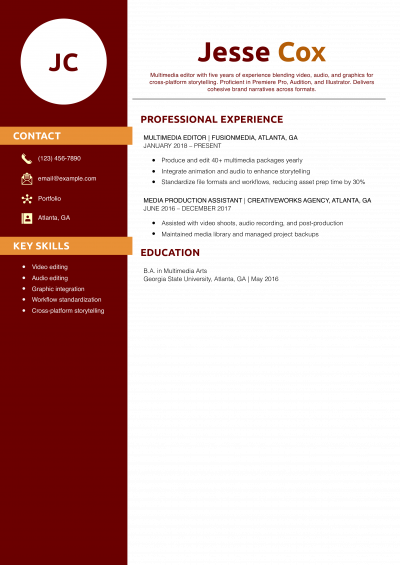
  • Deedy: A polished two-column template popular with engineers. The sidebar reads out of order in many ATS parsers, so use it only for human-reviewed or PDF-only submissions and switch to a single-column resume for anything going through an online application.
  • Awesome-CV: A bold single-column template with a distinctive colored header. It works for a one- or two-page resume; just strip its icon fonts and keep the contact line as plain text for ATS safety.
  • moderncv: A long-standing package with five built-in styles (casual, classic, banking, oldstyle, fancy). Reliable and well-documented; pick a single-column style and keep the layout plain for ATS.
  • Overleaf gallery: Overleaf hosts all of the above plus hundreds more, editable in the browser with no install. The fastest way to open a template and start editing today.
Written by professional resume writers and loved by hiring managers

Resume Templates offers HR approved resume templates to help you create a professional resume in minutes. Choose from several template options and even pre-populate a resume from your profile.

Frequently Asked Questions

What is a LaTeX resume?

A LaTeX resume is a resume written as a .tex source file and compiled into a PDF.

You write commands like \section{Experience} and \item, then LaTeX typesets the output with steady spacing and fonts. Recruiters see only the PDF, never the source.

Is LaTeX good for resumes?

LaTeX is a strong choice when you want consistent typography and a source file you can version in Git. It is common in software, engineering, data, and academic fields.

The tradeoff is a learning curve and slower one-off edits. It fits people who already use it or expect to apply often from the same source.

Are LaTeX resumes ATS-friendly?

A single-column LaTeX resume exported as a text-selectable PDF parses about as well as a clean Word file.

Problems come from template choices, not LaTeX itself: multi-column layouts, FontAwesome icons, custom glyphs, and tables used for layout can scramble parsing.

Test by copying your PDF text into a plain text editor and confirming it reads in order with no missing letters.

Is a LaTeX resume better than a Word resume?

Neither is better in the abstract. LaTeX wins on typographic consistency, version control, and rebuilding the same PDF from source years later.

Word wins on fast edits, comments from reviewers, and meeting employers who request a .docx file.

Many people keep both: a LaTeX source as the canonical PDF and a Word copy for applications that require it.

Should I list LaTeX as a skill on my resume?

List LaTeX as a skill only if the role involves technical writing, academic publishing, or documentation where you will use it.

For most software and data roles, LaTeX is a tool you happen to use for your own resume, not a hiring signal.

If you do list it, group it with other tools like Git, Markdown, or Pandoc rather than with programming languages.

What's the best resume template for a job seeker?

For a job seeker, an ATS-friendly template is the safest pick, because it puts your certifications and experience where a hiring manager scans first. A basic template is a solid alternative. Whichever you choose, keep the formatting clean and easy to parse: clear section headings, a standard font, and no graphics a parser can choke on.

Rate this article

LaTeX Editor Resume

Average Rating

4.6/5 stars with 227 reviews

You have given 0 Star(s)
4.6/5 stars with 227 reviews
Andrew Stoner

Executive Resume Writer and Career Coach

Andrew Stoner is an executive career coach and resume writer with 17 years of experience as a hiring manager and operations leader at two Fortune 500 Financial Services companies, and as the career services director at two major university business schools.