Technical Support Resume Examples
Open with your years in support, the tier you work at, and the environment you know best. A Tier 1 help desk role in a SaaS company looks different from a Tier 3 escalation seat…
Every resume example is written and reviewed by our team of Certified Professional Resume Writers to ensure top-quality content and formatting.
Most IT support roles fill based on ticket volume, resolution speed, and uptime stats. IT managers and technical recruiters scan for proof you can troubleshoot real systems. They want to see tools like Active Directory or a specific ticketing platform.
Your resume should list concrete metrics, such as average resolution time or first-call fix rate. Certifications like CompTIA A+ or ITIL 4 Foundation strengthen your profile at every level. To compare layouts before you start, browse our resume templates.
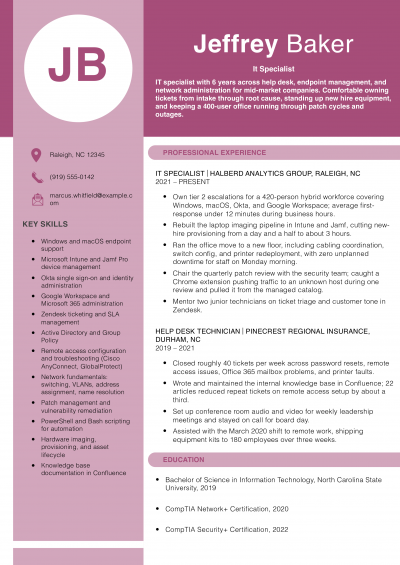
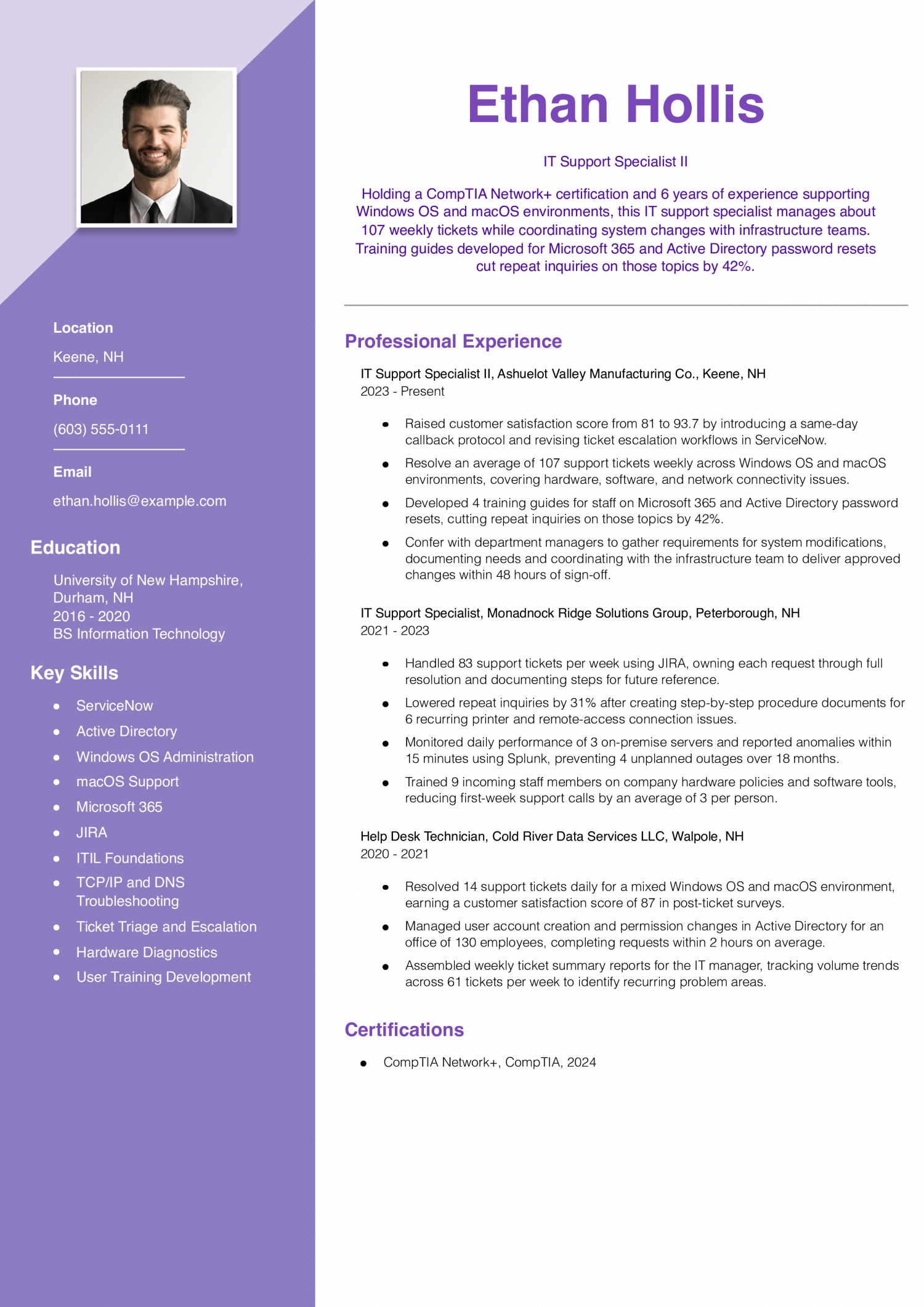
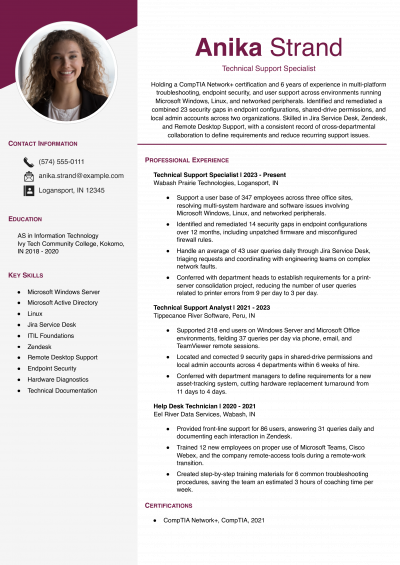
Consider this resume if you are a mid-level IT support specialist with about six years of ticket resolution and end-user training experience. Lead with the callback or escalation protocol you built and the satisfaction score it moved.
IT managers hiring a support specialist look for people who fix a problem once, not over and over. This resume names the guides written and the drop in repeat questions that followed. When you write guides or runbooks, state how many you made and how much the number of repeat tickets fell afterward.
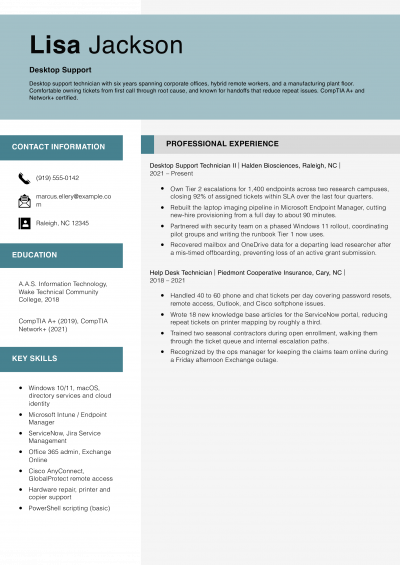
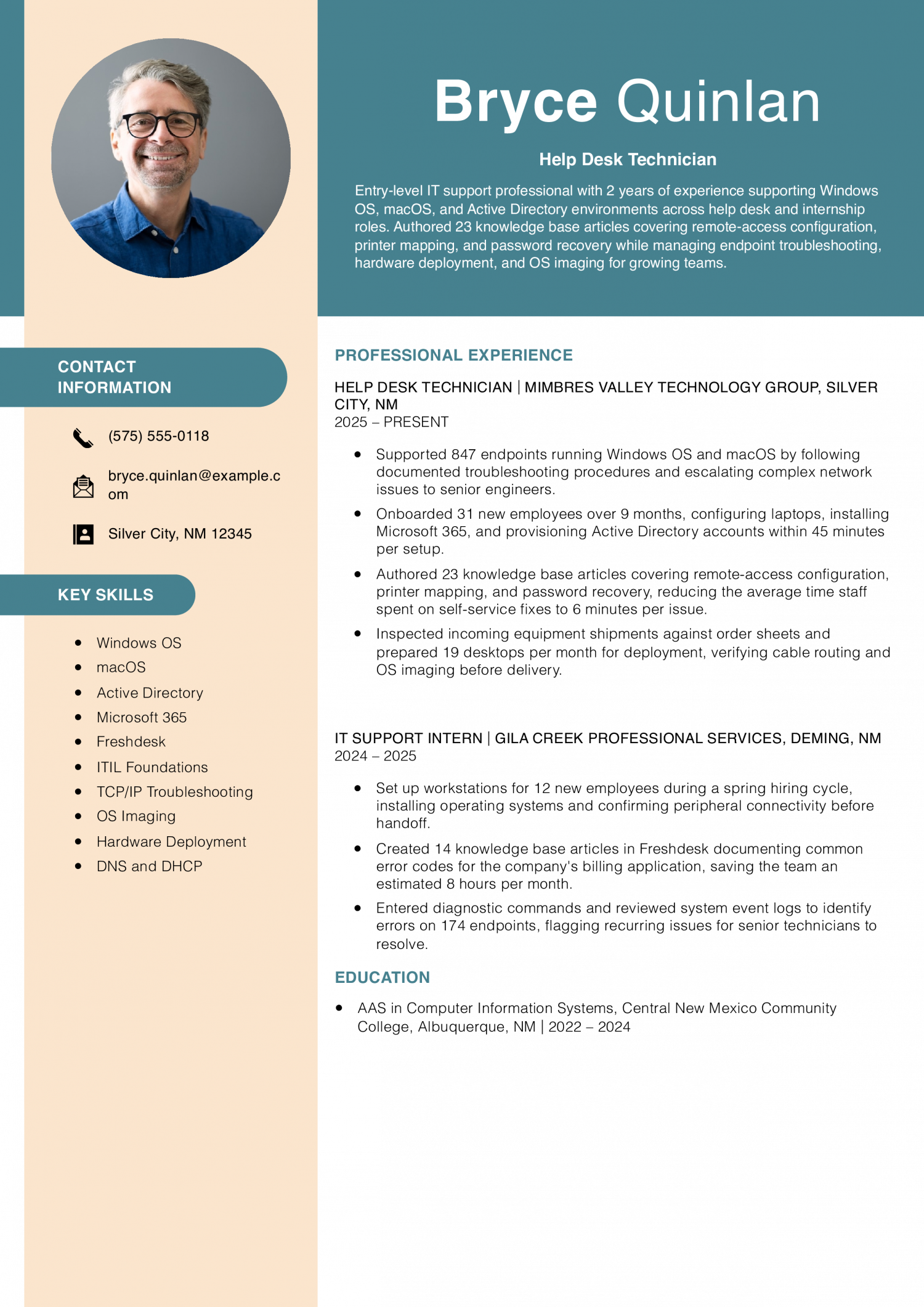
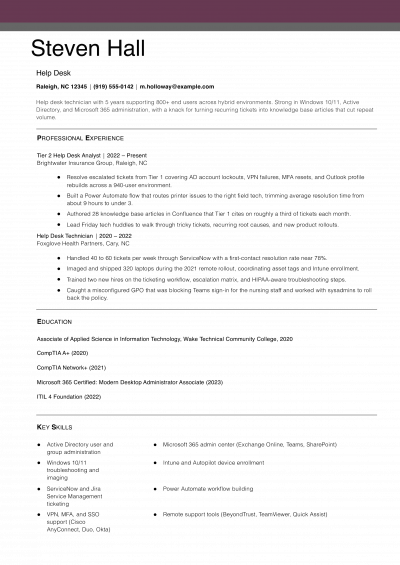
Start with this resume if you are an entry-level help desk technician moving from an IT internship into a full-time support role. Lead with specific endpoint counts and onboarding totals that prove hands-on volume even in a short career.
Technical recruiters hiring a help desk technician want to see how many devices and people you can handle and how long a setup takes you. This resume gives the count of endpoints and the minutes for each laptop setup. On your own resume, state the number of devices and the usual time each one took.
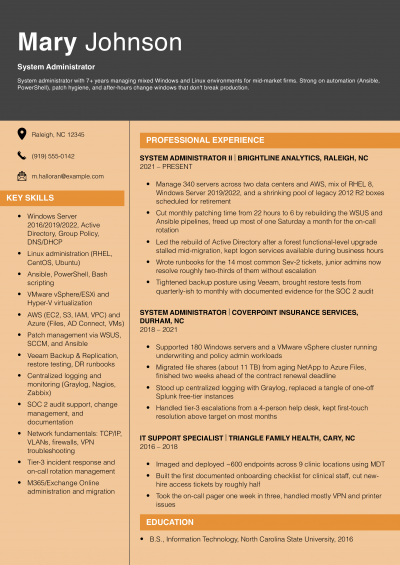
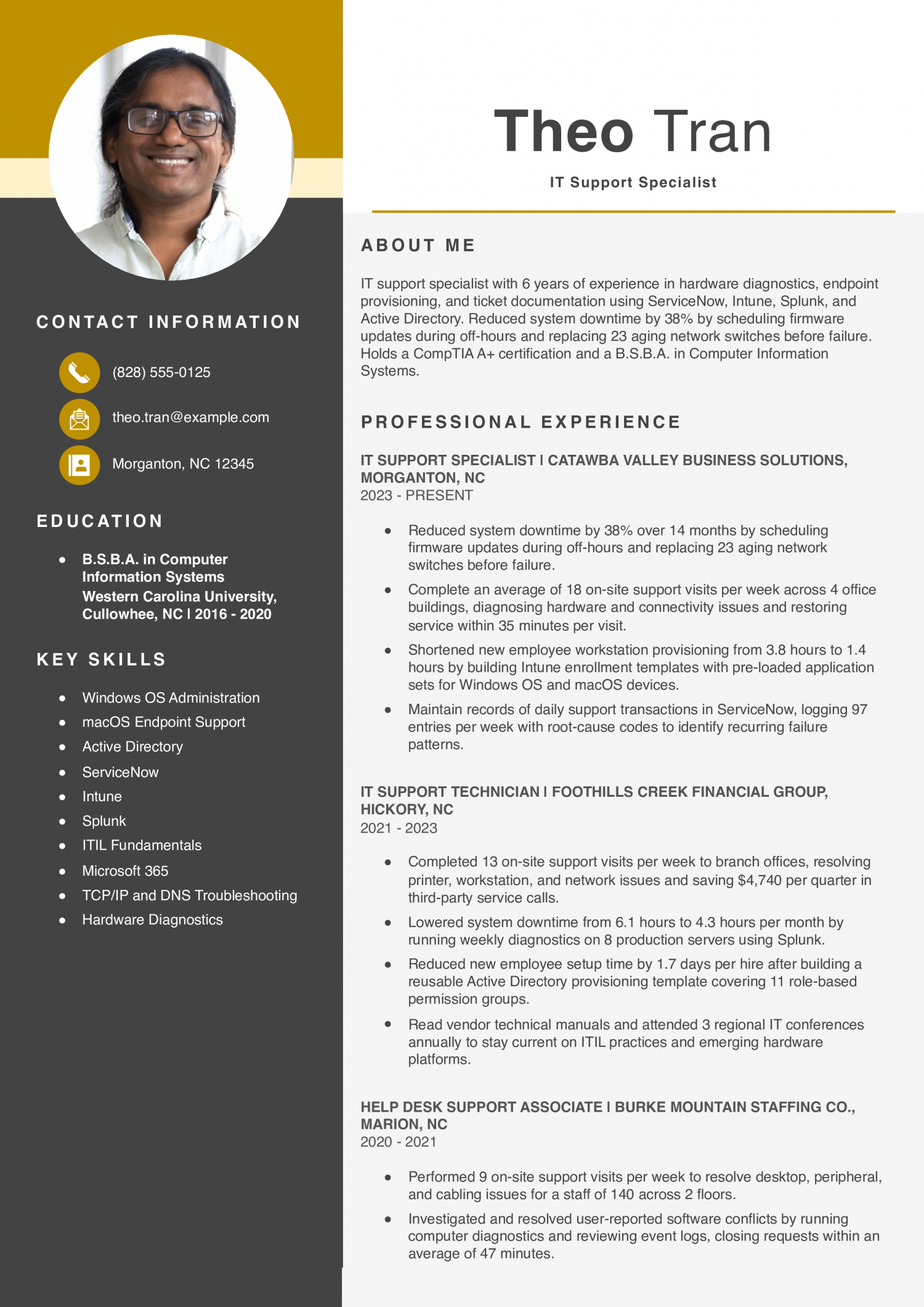
Try this resume if you are a mid-level IT support specialist with about six years of on-site troubleshooting and endpoint management experience. Lead with provisioning time reductions tied to the specific enrollment templates or directory structures you built.
Hiring managers for an IT support specialist look for someone who keeps systems running and spots repeat problems. This resume ties the number of entries logged each week to the root cause codes used. When you describe your ticket habits, name the tagging method you use and the pattern it helped you catch.
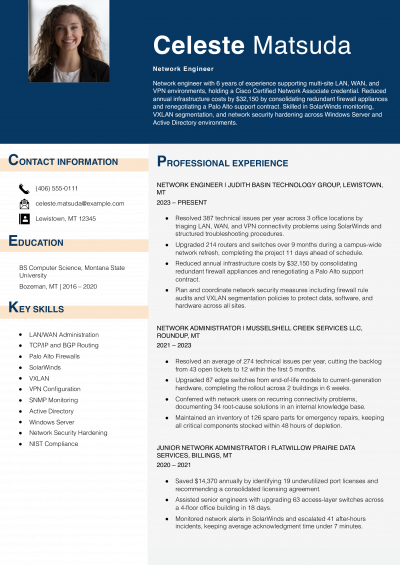
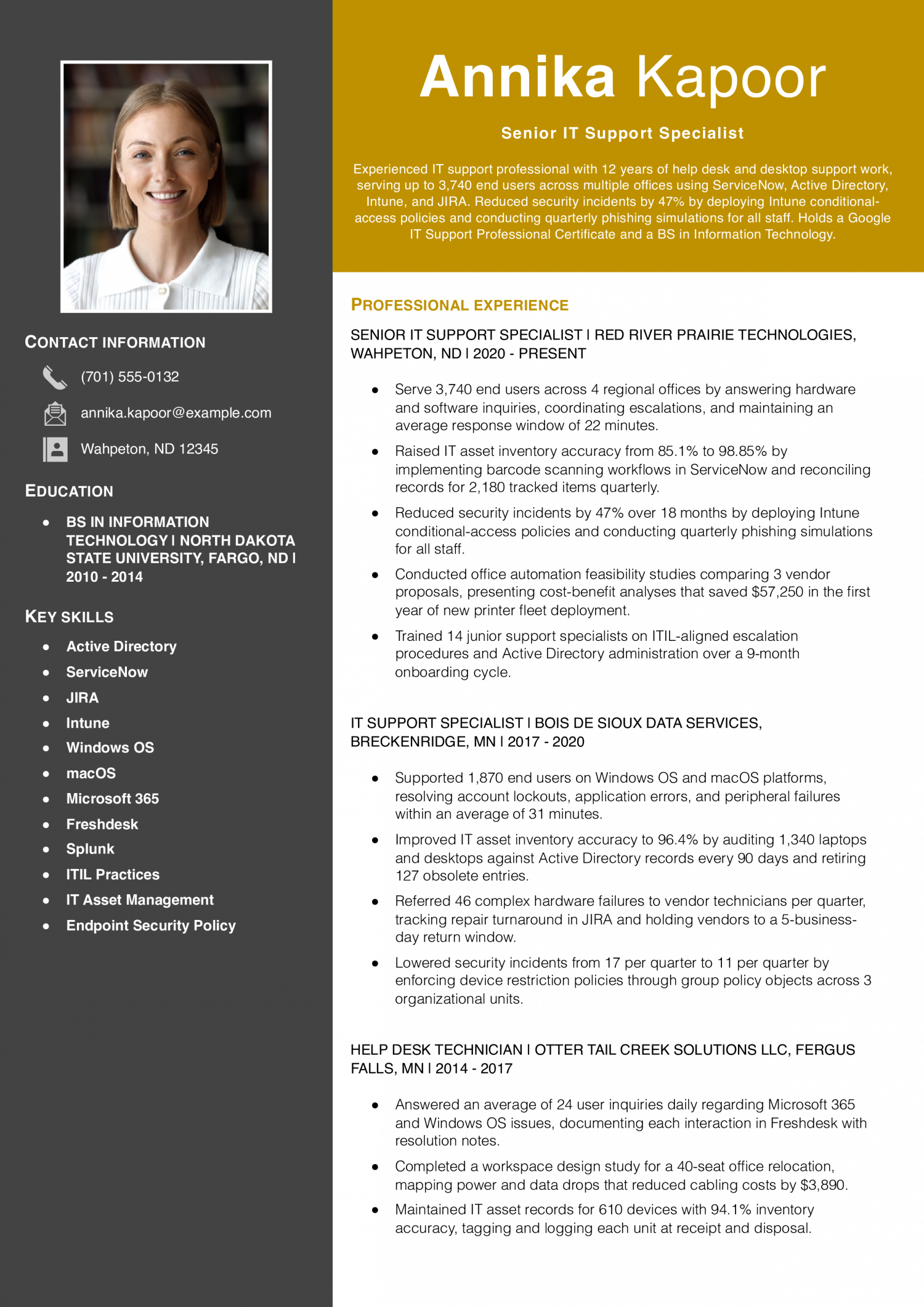
Lean on this resume if you are a senior IT support specialist with about twelve years of experience spanning help desk through enterprise endpoint management. Lead each bullet with the scale of users or devices affected, then attach the process change and the before-and-after metric it produced.
Teams hiring a senior support specialist want someone who holds vendors to a deadline and gets hardware back on time. This resume names the tracking tool and the number of days vendors had to return repaired hardware. On your own resume, name your tracking tool and the turnaround you enforced.
Hardware-focused IT support professional with 6 years of experience maintaining fleets of desktops, laptops, printers, and peripherals across Windows OS and macOS environments. Reduced critical alerts by 36% by configuring threshold rules in Splunk and replacing 41 failing hard drives before they triggered outages. Holds an ITIL 4 Foundation certification and uses JIRA, Active Directory, and Microsoft 365 to standardize diagnostic workflows and accelerate ticket resolution.
Hiring managers can confirm your A+ or Network+ in seconds. The context that sets you apart is harder to find. Lead your profile with a specific detail another candidate is unlikely to share.
That could be a platform you support, like Azure AD. It could be a user base size or an environment type. A bilingual help desk background works well here too.
State the fact in one line, right at the top of page one. This single detail tells a reviewer why your ticket history matters more than the next person’s. Keep it concrete and skip vague claims about being a team player.
Let the rest of your resume prove soft skills through results.
IT support work produces more data than most people realize. Track your average ticket volume per day or week. Note your first-call resolution rate as a percentage.
Mean time to resolution is another strong metric to include. If you rolled out hardware for a large group, state the seat count. If you cut escalations, give the percentage.
Put it in a bullet. IT managers and technical recruiters scan for proof that you can handle scale under pressure. A bullet that reads “resolved 45 tickets per day with 89% first-call resolution” tells a clearer story than “handled end-user requests.” Pair every action verb with a number when the data exists.
Organize your bullets under each job into three to five task groups. Hardware and imaging is one natural cluster. Desktop and laptop deployment, peripheral setup, and asset tagging fit here.
Network and connectivity is another group. Cover Wi-Fi troubleshooting and VPN configuration in this section. Account administration is a third category.
Include Active Directory resets and permissions changes. A fourth group can cover software support. Think application installs, patch management, and license tracking.
If you handle onboarding or offboarding, that forms a fifth group. These categories help IT managers and technical recruiters scan your resume fast. They also show you understand how a real support team divides its daily workload across the group.
IT managers and technical recruiters often skim the top third before reading any bullet. List your CompTIA A+ on its own line with “CompTIA” as the issuer.
Do the same for CompTIA Network+ if you hold it. The Google IT Support Professional Certificate belongs here too. ITIL 4 Foundation from PeopleCert fits this block as well.
Follow with the ticketing system you use, such as ServiceNow or Jira Service Management.
Name your remote support tool, such as TeamViewer.
For entry and mid-level IT support roles, your education section closes the resume. Write your degree, the school, and the year you finished on one line. An associate degree in IT or a related field is common for these roles, and a bachelor’s degree in computer science or MIS works well too.
If you lack a degree, place your certifications higher on the page because they carry real weight in IT support hiring. Add any vendor training you finished, such as a Microsoft or Cisco course.
If you are changing careers, highlight transferable skills like customer service volume. Note any home-lab projects or freelance support work you completed to show initiative.
IT managers and technical recruiters read a lot of IT support resumes. The ones they shortlist name specific tools and clear ticket metrics. Hard skills like Active Directory or TCP/IP show you can own the technical work.
Soft skills tell a different story. They show how you handle upset users under pressure. A strong ticket time means little if you lack patience.
They look for terms that match the posting word for word. Soft skills like problem solving need proof in your work bullets.
Put each matching term in your skills block or your bullets, and tie each soft skill to a short result.
| Soft Skills | AI-estimated % |
|---|---|
| User patience | 67% |
| Clear technical communication | 59% |
| Calm under pressure | 44% |
| Cross-team collaboration | 36% |
| Prioritization of requests | 32% |
And here are the top hard skills showing up most often.
| Hard Skills | AI-estimated % |
|---|---|
| Help desk troubleshooting | 73% |
| Hardware installation | 58% |
| Remote desktop support | 45% |
| Ticket queue management | 36% |
| Network connectivity diagnosis | 29% |
Skill names and rankings come from an AI model grounded in U.S. Department of Labor occupation data for IT support specialists, not from a count of IT support specialists’ resumes built on ResumeTemplates.com.
For an IT support resume, IT managers and technical recruiters look at help desk troubleshooting and hardware installation first, so the items below back those up with detail.
IT managers and technical recruiters scan for terms tied to real tasks. Generic labels like “computer skills” rarely match a job posting. Desktop support terms cover hands-on fixes for end users. Networking keywords show you can keep systems connected and secure. Ticketing terms prove you track and resolve issues on time. Security keywords flag your role in protecting endpoints and data. Certifications tell reviewers which vendor standards you have met. Place each term in the most relevant section of your resume. Match the exact phrasing you see in the posting. Swap terms in or out for each new role.
| Niche | Keywords ATS scans for |
|---|---|
| Desktop Support | Active Directory, OS imaging, hardware troubleshooting |
| Network Administration | TCP/IP, DNS configuration, subnet troubleshooting |
| Ticketing Systems | ServiceNow, Jira Service Management, SLA compliance |
| Endpoint Security | patch management, antivirus deployment, Group Policy |
| Certifications | CompTIA A+, CompTIA Network+, ITIL 4 Foundation |
IT managers may see AI claims on support resumes that range from vague to inflated. You can overstate your skills with buzzwords like ‘AI-driven troubleshooter.’ Or you can say nothing about AI and handle the topic if it comes up. Or you can name the exact tools and the manual checks you still run. The third option is what IT managers and technical recruiters can validate. List each tool next to the task it handles. Then note where you still verify the output. A clear workflow line beats a flashy label every time. This approach shows you use AI as a real aid, not a talking point.
AI classifies and routes incoming tickets by priority, but techs still confirm severity and reassign edge cases.
Chatbots surface help articles for common issues, though you still write and update those articles yourself.
Log analysis tools flag error patterns across systems, yet you interpret results and confirm fixes before closing.
Automated self-service portals handle routine resets, freeing you for access audits and escalations.
Hiring managers read your tech stack first. A clear list tells them what you can touch on day one. Group tools by category so the list is easy to skim.
Beyond the basic tech skills you show in your work history, these credentials tell IT managers and technical recruiters how deep your knowledge runs. They signal whether you can handle network issues, follow service frameworks, or troubleshoot hardware on your own. Many job posts name one or two of these by title.
Listing them in a clear block helps your resume pass an early scan. Add the year you earned each one so reviewers can gauge how current your training is. You do not need every cert on this list to get calls back from employers.
Pick the ones that match the posting, and place them near the top of your resume. A short certs block right below your summary catches a reader’s eye fast. If you hold more than one, order them from most to least relevant for that role.
Keeping this section tight and accurate shows you respect a reviewer’s time.
The BLS median for IT support includes pay for entry-level and help desk roles.
Pay across this field spreads out widely. That spread tells you the field rewards depth over time served. A narrow skill set blends into the crowd, and staying at one level for too long keeps your pay flat.
Specialists who build real range in their toolkit tend to move up faster. To stand out, lead your resume with the specific systems you support and the ticket volume you handle, not a generic list of soft skills.
| # | State | Median Annual |
|---|---|---|
| 1 | District of Columbia | $80,950 |
| 2 | California | $79,570 |
| 3 | Washington | $75,220 |
| 4 | Massachusetts | $75,070 |
| 5 | New York | $72,560 |
| 6 | Colorado | $71,900 |
| 7 | Connecticut | $70,210 |
| 8 | Wyoming | $65,100 |
| 9 | Virginia | $65,040 |
| 10 | Maryland | $64,750 |
| # | State | Workers | Median |
|---|---|---|---|
| 1 | California | 74,490 | $79,570 |
| 2 | Texas | 72,030 | $59,490 |
| 3 | Florida | 51,220 | $58,740 |
| 4 | New York | 39,100 | $72,560 |
| 5 | Pennsylvania | 30,560 | $58,670 |
Resume Templates offers HR approved resume templates to help you create a professional resume in minutes. Choose from several template options and even pre-populate a resume from your profile.
Lead with a skills section that lists the operating systems and ticketing tools you used in coursework or home labs. Follow it with a projects section that describes setups you built or problems you solved.
The Google IT Support Professional Certificate gives you a credential line even before your first paid role.
Name the exact tools you used on calls, such as ServiceNow or a remote desktop client. Then add a metric like average handle time or first-call resolution rate.
IT managers and technical recruiters want to see how fast you closed tickets, not a generic list of soft skills.
Use the title your employer gave you, then add a parenthetical with the closest standard title. For example, write "Desktop Technician (IT Support Specialist)" so the ATS matches the keyword.
Changing your official title without a parenthetical can look dishonest during a background check.
List the operating systems you have configured, such as Windows 10 and 11 or macOS. Add your ticketing platform and any remote support or endpoint management tool you have used.
Match each tool to the version or environment the job posting names. IT managers filter for exact platform experience.
Shift each bullet from personal ticket counts to team-level outcomes like SLA compliance or reduced escalation rates. Add any mentoring, training, or shift-lead duties you held, even informally.
A line about ITIL 4 Foundation signals that you understand service management beyond the help desk.
One page is enough for most people with under ten years in the field. If you have held several specialized roles across different environments, a second page is acceptable.
Keep the strongest metrics and most recent positions on page one so reviewers see your value right away.
List the gap period with a brief label such as "Career Break" and note any relevant activity you completed. Earning CompTIA A+ or building a home lab during that time shows you stayed current.
Current skills matter more to IT managers than a perfect timeline.
If you are unsure, an ATS-friendly template is a good default for an IT support specialist resume, and a basic template is a good second choice. Simple headings, one standard font, and no graphics keep either one readable.
IT Support Resume
4.5/5 stars with 182 reviews

Executive Resume Writer and Career Coach
Andrew Stoner is an executive career coach and resume writer with 17 years of experience as a hiring manager and operations leader at two Fortune 500 Financial Services companies, and as the career services director at two major university business schools.
© 2026 Resumetemplates.com All rights reserved.