ResumeTemplates.com LOGO
  • Resume Templates
      TOP RESUME TEMPLATES
    • College
    • Combination
    • Stylish
    • Technology
    • Minimalist
    • Functional
    • Professional
    • Google Docs
    • Hybrid
    • ATS Friendly
    • Chronological
    • Microsoft Word
    • Traditional
    • Creative
    • Basic
    • General
    • Skills Based
    • Modern
    • Use our free resume templates tool
      Examples of resumes in our free resume builder tool

      When choosing a resume template, the priority should be a clean, professional look that can focus on your career accomplishments.

      Build My Resume
      View all 100+ Resume Templates
  • Resume Builder App
  • Resume Examples
      TOP RESUME EXAMPLES
    • Software Engineer
    • Registered Nurse
    • Sales
    • Customer Service Representative
    • Software Developer
    • Accountant
    • Coaching Resume
    • Product Manager
    • Teacher
    • Medical Assistant
    • Information Technology
    • Project Manager
    • Administrative Assistant
    • Bartender
    • Use our free resume templates tool
      Examples of resumes in our free resume builder tool

      When choosing a resume template, the priority should be a clean, professional look that can focus on your career accomplishments.

      Build My Resume
      View all 100+ Resume Examples
  • Resources
      Top Resources
    • Adding Your Writing Skills on a Resume
    • Bartender Job Description for a Resume
    • Best Resume File Formats
    • Effective Communication Skills for Resume With Examples, Tips, and Guide
    • Functional vs. Chronological Resume
    • Google Docs Resume Templates
    • Hobbies and Interests for Resumes
    • How Far Back Should a Resume Go?
    • How Much Does a Resume Builder Cost?
    • How To Demonstrate Organizational Skills
    • How To Edit a Resume Template in Word
    • How To Include Salary Requirements in Resumes
    • How To Insert a Picture in a Google Doc Resume Template
    • How to List Projects on a Resume
    • How To List Your Education on a Resume
    • How To Make a Resume
    • How To Make a Resume With No Job Experience
    • How to Make Your Resume Stand Out and Land Your Dream Job
    • How To Nail an Impressive Beginner Resume Summary
    • How To Present Your Accomplishments on a Resume
    • How To Say You’re a Quick Learner on Your Resume
    • How To Say You’re a Subject Matter Expert on a Resume
    • How To Upload Your Resume to Indeed
    • How To Write a Business Resume
    • How To Write a Cover Letter for a Resume
    • How To Write an Impressive Resume With Only One Job
    • How To Write a Resume Summary
    • How To Write a Student Resume
    • How To Write an Address on One Line
    • Key Skills Examples for Your Resume
    • Listing Udemy Certificates on a Resume
    • Make a Resume in Microsoft Word
    • Putting Coursera Certificates on a Resume
    • Resume Buzzwords and Cliches To Avoid
    • Resume Header Examples
    • Resume Icons, Logos, and Symbols
    • Resume Introduction And Intro Paragraph Examples
    • Resume Objective Examples
    • Resume Punctuation
    • Resume Vs. Curriculum Vitae
    • Should I Put My GPA on My Resume And How To List It
    • Summary of Qualifications for a Resume
    • The Best Color for Your Resume
    • The Complete Guide To Listing a U.S. Military Address on Your Resume
    • Types of Resume Templates
    • What Resume Template Do Employers Prefer?
    • What Template Should I Use for a Federal Resume?
    • What To Put on a Resume
    • Where To Find Free Resume Templates
    • Where To Post Your Resume for Remote Work
    • Write a Resume With No Experience
    • See all Resources
  • Research
      RESEARCH
    • 4-Day Work Week Survey
    • AI Hiring Survey
    • AI Lay Off Survey
    • AI Manager Survey
    • ChatGPT and Skill Assessments
    • ChatGPT Competence Survey
    • ChatGPT Contributes to Raises
    • Companies Increase In-Office Days
    • Companies Offer Lower Salaries YoY
    • Companies Reduce Salaries and Benefits
    • Companies Replace Workers With AI
    • DEI Survey
    • Employee Coffee-Badging
    • Employee Layoffs
    • Gen Z Interview Survey
    • Gen Z Worker Parents Survey
    • Hard and Soft Skills Hiring Survey
    • Hiring Managers Favor AI Skills
    • Hiring Managers Pass on Bad Resumes
    • Hiring Report
    • Listing Pronouns on Resumes
    • Lying on Resumes
    • Manager Gen Z Survey
    • Rehiring Workers Survey
    • See All Research Reports
  • Resources
      Top Resources
    • How To Fill Out A Resume Template
    • Guides and AdviceRESEARCH
    • Adding Your Writing Skills on a Resume
    • Bartender Job Description for a Resume
    • Best Resume File Formats
    • Effective Communication Skills for Resume With Examples, Tips, and Guide
    • Functional vs. Chronological Resume
    • Google Docs Resume Templates
    • Hobbies and Interests for Resumes
    • How Far Back Should a Resume Go?
    • How Much Does a Resume Builder Cost?
    • How To Demonstrate Organizational Skills
    • How To Edit a Resume Template in Word
    • How To Include Salary Requirements in Resumes
    • How To Insert a Picture in a Google Doc Resume Template
    • How to List Projects on a Resume
    • How To List Your Education on a Resume
    • How To Make a Resume
    • How To Make a Resume With No Job Experience
    • How to Make Your Resume Stand Out and Land Your Dream Job
    • How To Nail an Impressive Beginner Resume Summary
    • How To Present Your Accomplishments on a Resume
    • How To Say You’re a Quick Learner on Your Resume
    • How To Say You’re a Subject Matter Expert on a Resume
    • How To Upload Your Resume to Indeed
    • How To Write a Business Resume
    • How To Write a Cover Letter for a Resume
    • How To Write an Impressive Resume With Only One Job
    • How To Write a Resume Summary
    • How To Write a Student Resume
    • How To Write an Address on One Line
    • Key Skills Examples for Your Resume
    • Listing Udemy Certificates on a Resume
    • Make a Resume in Microsoft Word
    • Putting Coursera Certificates on a Resume
    • Resume Buzzwords and Cliches To Avoid
    • Resume Header Examples
    • Resume Icons, Logos, and Symbols
    • Resume Introduction And Intro Paragraph Examples
    • Resume Objective Examples
    • Resume Punctuation
    • Resume Vs. Curriculum Vitae
    • Should I Put My GPA on My Resume And How To List It
    • Summary of Qualifications for a Resume
    • The Best Color for Your Resume
    • The Complete Guide To Listing a U.S. Military Address on Your Resume
    • Types of Resume Templates
    • What Resume Template Do Employers Prefer?
    • What Template Should I Use for a Federal Resume?
    • What To Put on a Resume
    • Where To Find Free Resume Templates
    • Where To Post Your Resume for Remote Work
    • Write a Resume With No Experience
    • Research
    • 4-Day Work Week Survey
    • AI Hiring Survey
    • AI Lay Off Survey
    • AI Manager Survey
    • ChatGPT and Skill Assessments
    • ChatGPT Competence Survey
    • ChatGPT Contributes to Raises
    • Companies Increase In-Office Days
    • Companies Offer Lower Salaries YoY
    • Companies Reduce Salaries and Benefits
    • Companies Replace Workers With AI
    • DEI Survey
    • Employee Coffee-Badging
    • Employee Layoffs
    • Gen Z Interview Survey
    • Gen Z Worker Parents Survey
    • Hard and Soft Skills Hiring Survey
    • Hiring Managers Favor AI Skills
    • Hiring Managers Pass on Bad Resumes
    • Hiring Report
    • Listing Pronouns on Resumes
    • Lying on Resumes
    • Manager Gen Z Survey
    • Rehiring Workers Survey
    • Resources
    • See all Resources
  • My Account
  • Use our free resume templates tool
    Examples of resumes in our free resume builder tool

    When choosing a resume template, the priority should be a clean, professional look that can focus on your career accomplishments.

Build My Resume
Build My Resume
Home / Resume Examples / 4 Best Office Clerk Resume Examples and Templates for 2026

4 Best Office Clerk Resume Examples and Templates for 2026

Andrew Stoner
By Andrew Stoner
Andrew Stoner
Executive Resume Writer and Career Coach linkedin
Andrew Stoner
, Executive Resume Writer and Career Coach
Last Updated: October 7, 2026

Every resume example is written and reviewed by our team of Certified Professional Resume Writers to ensure top-quality content and formatting.

Most office clerk roles draw dozens of local applicants with similar work history. What sets you apart is proof you kept records accurate, handled multi-line phones, and processed documents on deadline. Office managers and administrative supervisors scan for named tools like Excel, QuickBooks, or filing systems you used daily.

Your resume should show volume, such as invoices processed per week or records maintained. A Microsoft Office Specialist (MOS) credential strengthens your case at the entry level. The examples below show how to frame that kind of detail clearly. To compare layouts before you start, browse our resume templates.

Administrative Clerk Resume Example

Office Clerk Resume

Customize this template in our builder in under 10 minutes.

Build my resume
Excellent Excellent
4.7 STARS on 4.7 STAR
flash image Get the 2x more job offers*
On this page
On this page
  • Office Clerk Resume Examples
  • How to Write an Office Clerk Resume
  • Most Popular Skills on Office Clerk Resumes for 2026
  • Must Have on an Office Clerk Resume
  • Office Administration Credentials Worth Listing
  • Latest BLS Statistics for Office Clerks
  • Frequently Asked Questions
  • Related Office Clerk Resume Examples
linkedin
twitter
facebook
Tip !

Office managers decide whether to keep reading by the skills summary; if proficiency with filing systems and software like Microsoft Office isn't obvious there, the resume moves to the rejection pile.

Andrew Stoner , Executive Resume Writer and Career Coach

Office Clerk Resume Examples

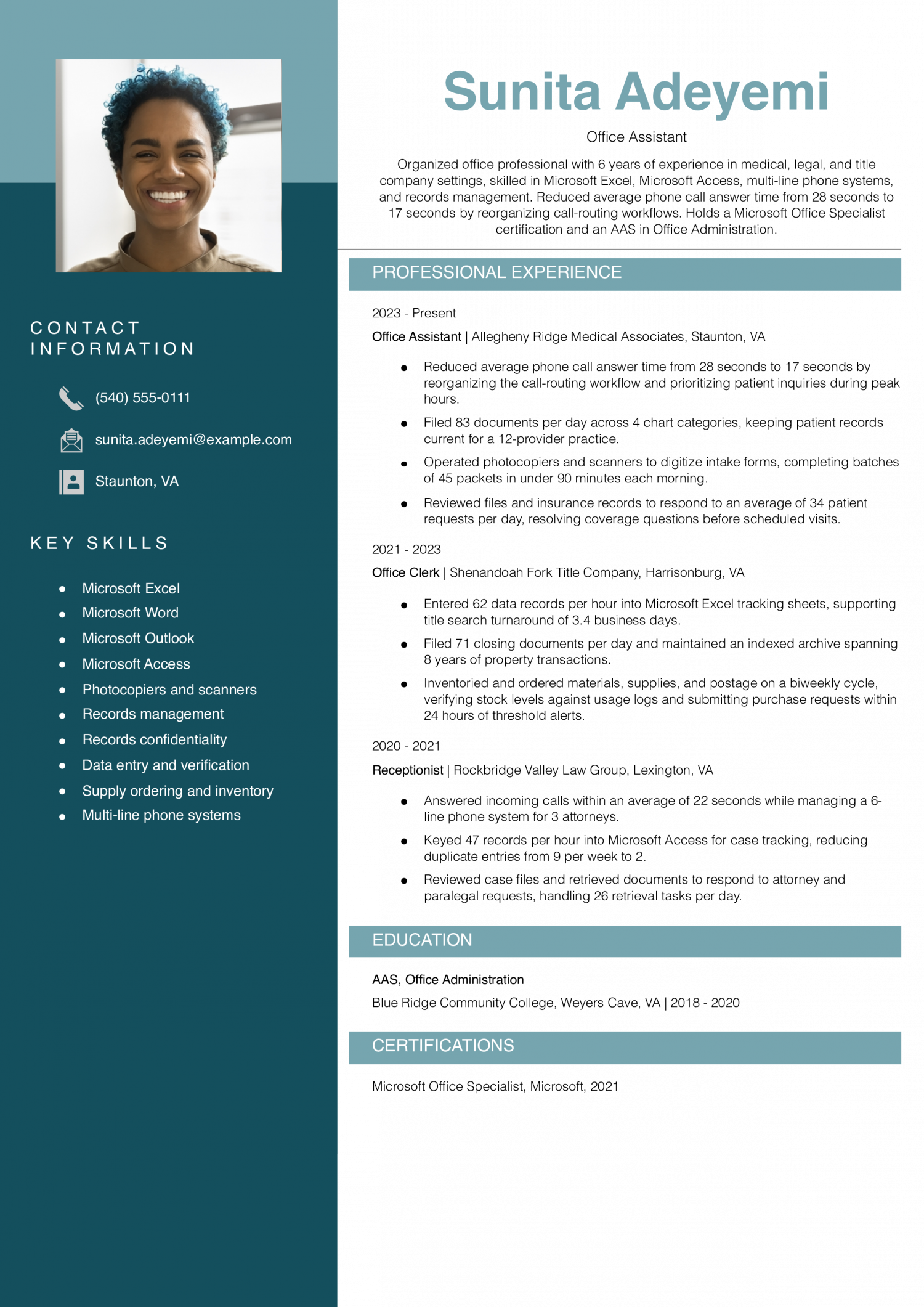
Featured Example

Pick this resume if you are a mid-level office assistant with about six years of experience across medical, legal, or title company offices. File away how it ties a supply-ordering cycle to a verification step rather than listing the duty alone.

Office Assistant Resume Example
PDF
DOCX
Use This Template
What to take from this resume example

Many office clerk resumes list data entry as a duty without any proof that the work was accurate. This resume sidesteps that problem with a specific before-and-after error count: “reducing duplicate entries from 9 per week to 2.” If you handle any task where mistakes are trackable, write down the starting number and the improved number so the hiring manager can see the exact quality difference you created rather than taking your word for it.

Jump to a separate text resume example ↓

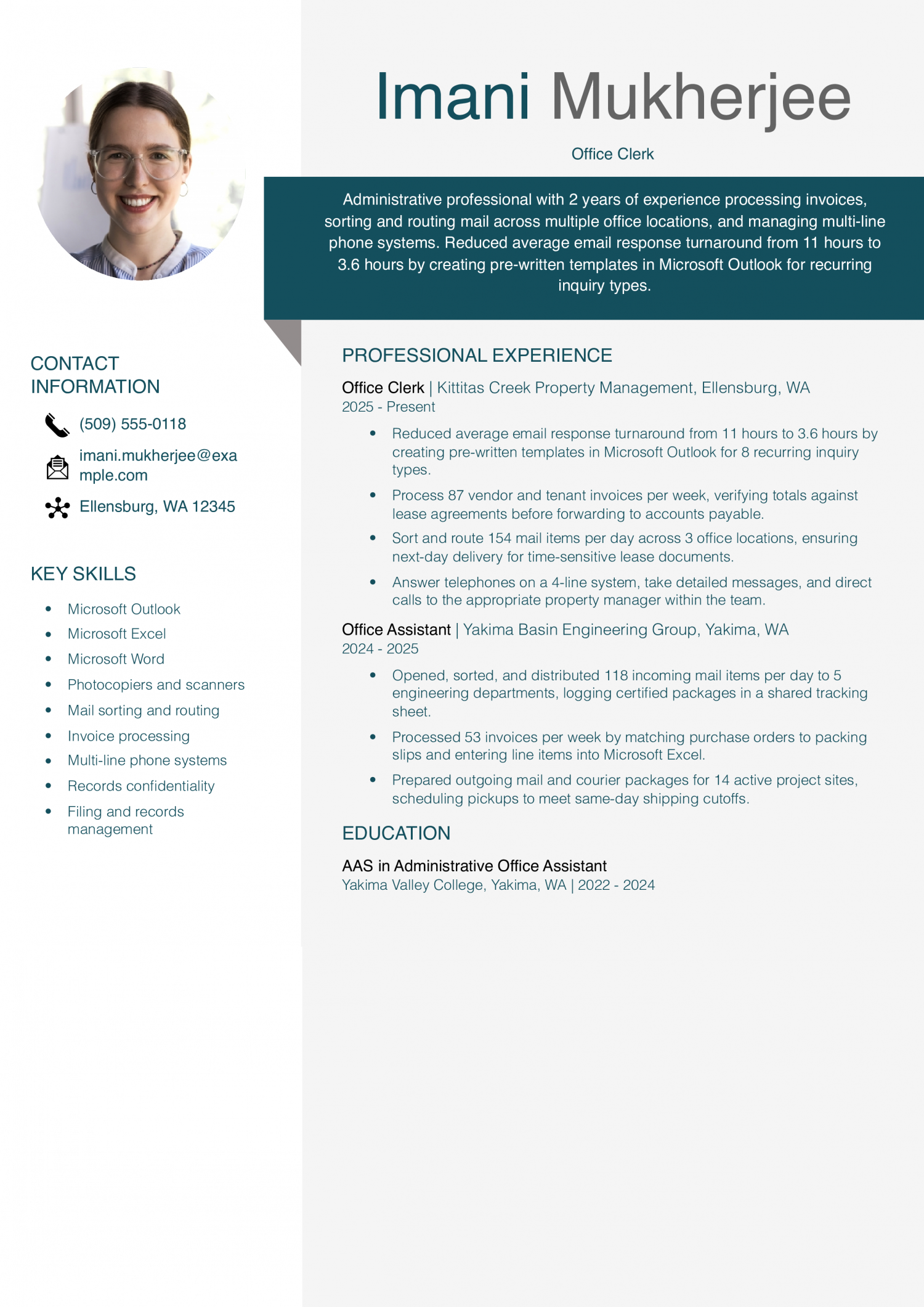
Office Clerk Example

Start with this resume if you are an entry-level office clerk beginning your career in property management or engineering office support. Front each bullet with a specific daily or weekly volume so your output is concrete rather than abstract.

Office Clerk Resume Example
PDF
DOCX
Use This Template
What to take from this resume example

Many office clerk resumes mention invoice processing without explaining what verification step they actually perform. This resume spells out the method: “verifying totals against lease agreements before forwarding to accounts payable.” If your job includes checking numbers before passing them along, name the specific document or source you compare against so the reader knows you catch errors at that stage, not further down the line.

Senior Office Clerk Example

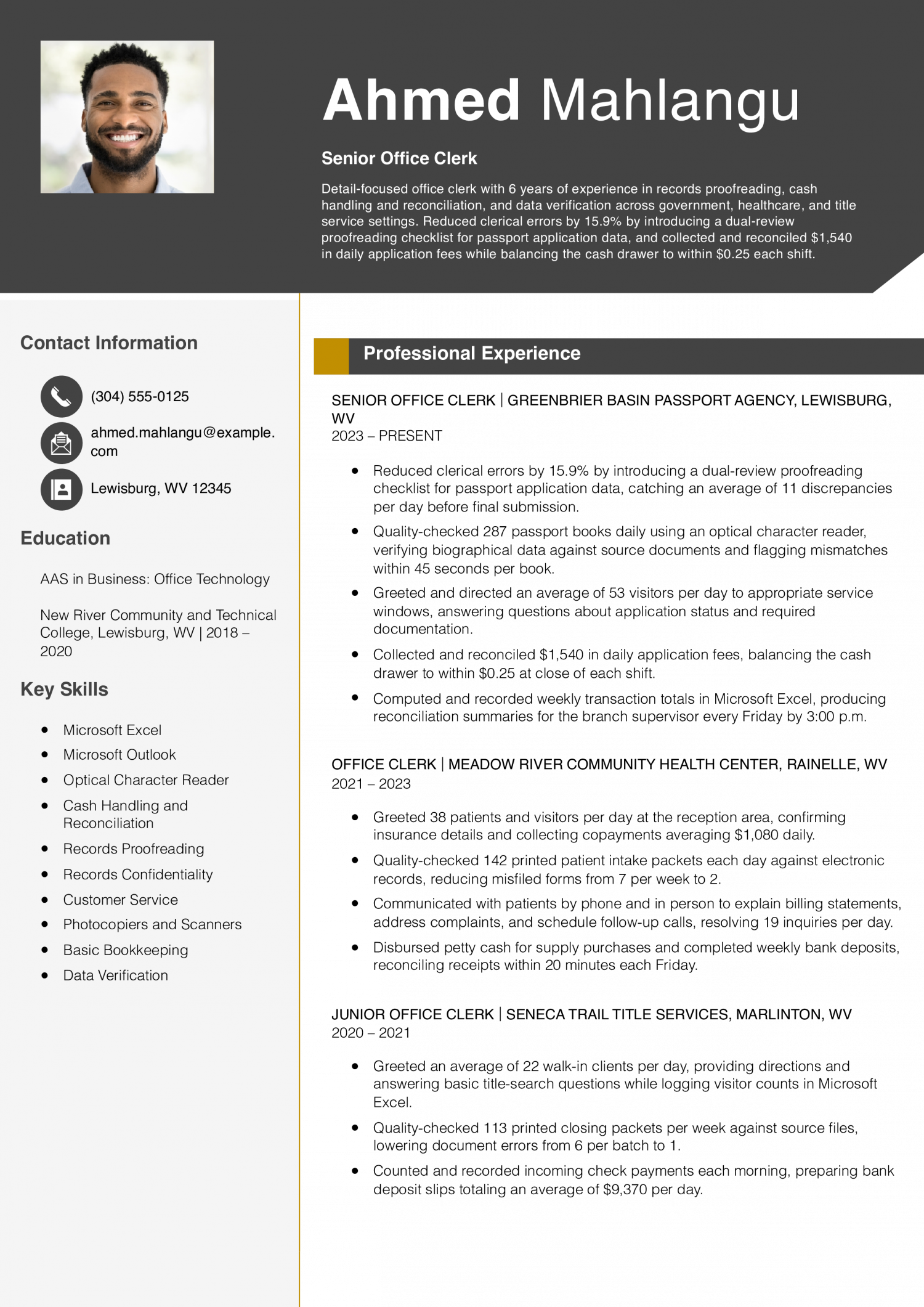
Try this resume if you are a mid-level senior office clerk with about six years of experience handling documents, fees, and visitor traffic in public-facing offices. Include a cash-drawer tolerance figure beside your daily collection total so the precision of your reconciliation work is clear.

Senior Office Clerk Resume Example
PDF
DOCX
Use This Template
What to take from this resume example

Many office clerk resumes mention quality checks without revealing how fast the work actually gets done. This resume pairs a daily volume with a per-record pace: “flagging mismatches within 45 seconds per book.” If your role involves reviewing files, forms, or records, time yourself on a typical unit and add that rate next to your daily count so the reader can judge both your speed and your accuracy in one line.

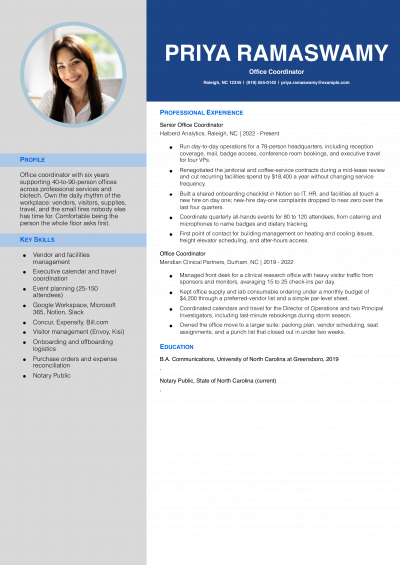
Office Coordinator Example

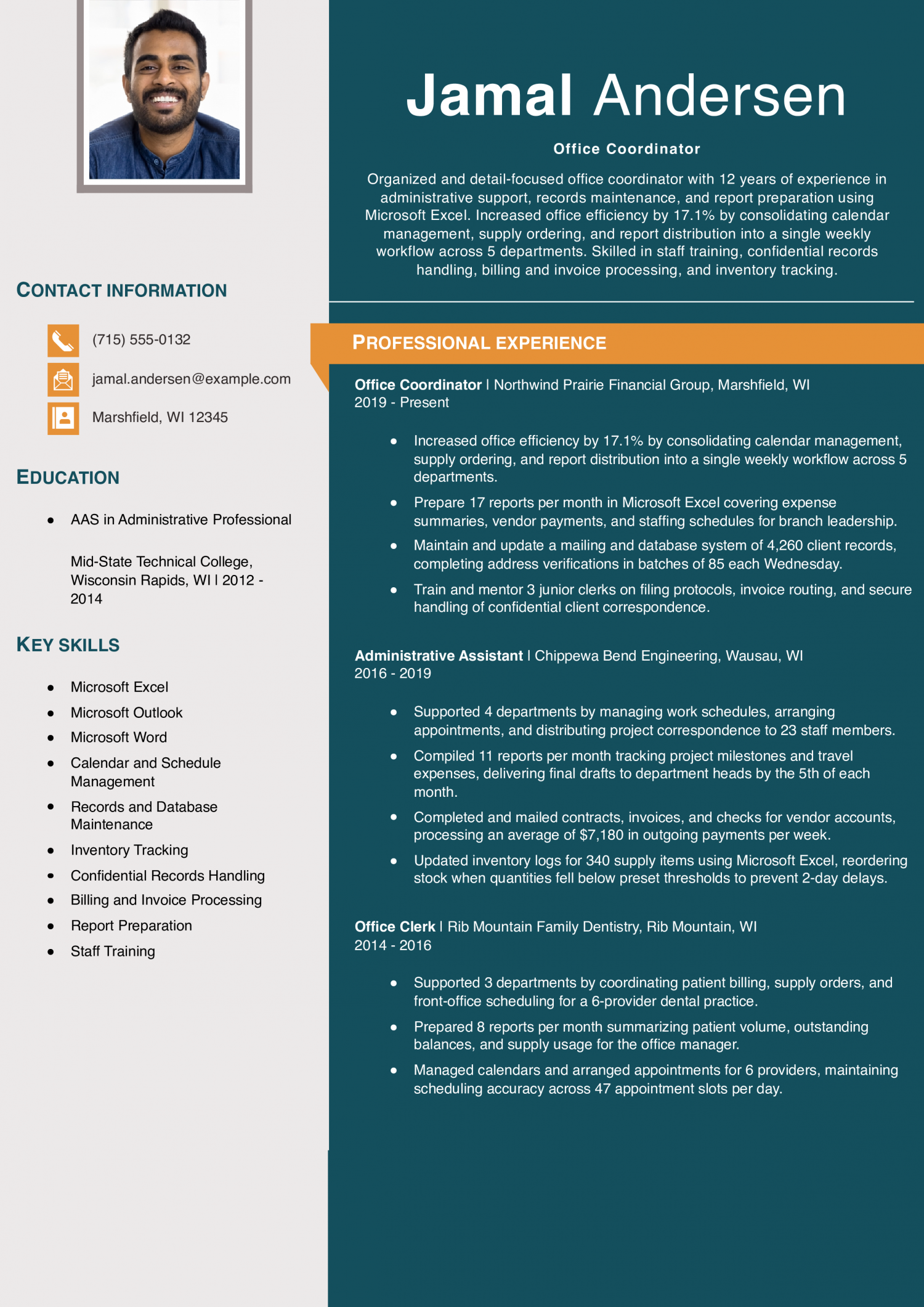
Lean on this resume if you are a senior office coordinator with roughly a decade of administrative experience spanning multiple industries. Highlight how it assigns a specific percentage gain to a workflow consolidation effort rather than listing duties alone.

Office Coordinator Resume Example
PDF
DOCX
Use This Template
What to take from this resume example

Many office clerk resumes mention training coworkers but never say how many people or what topics were covered, leaving the reader to wonder about the scope. This resume pins down both: “Train and mentor 3 junior clerks on filing protocols, invoice routing, and secure handling of confidential client correspondence.” If you have trained or onboarded anyone in your role, state the number of people and list the specific procedures you taught so the hiring manager can see the real reach of your contribution.

Text Version Office Clerk

Caleb Carver
Sheridan, WY | (307) 555-0139 | [email protected]

PROFESSIONAL SUMMARY

Experienced administrative professional with 6 years of scheduling, records management, and procurement support across municipal, veterinary, and title company offices. Saved $13,740 in annual procurement costs by renegotiating contracts with office supply vendors and switching to bulk purchasing. Skilled in Microsoft Word, Microsoft Excel, and Microsoft Outlook, with a background in digitizing over 1,300 paper files and coordinating daily appointment calendars for multiple staff members.

EXPERIENCE

Administrative Clerk
Tongue River Land & Title | Sheridan, WY | 2023-Present
  • Saved $13,740 in annual procurement costs by renegotiating contracts with 4 office supply vendors and switching to bulk purchasing for toner, paper, and postage materials.
  • Schedule an average of 27 client appointments per day, coordinating availability across 3 title officers and 2 closing agents.
  • Converted 847 paper title files to digital format in a single quarter by scanning, indexing, and uploading documents to the shared drive.
  • Type, format, and proofread closing documents and correspondence in Microsoft Word, completing an average of 14 letters and disclosure packets per day from attorney notes.
Office Clerk
Bighorn Basin Veterinary Services | Buffalo, WY | 2021-2023
  • Reduced quarterly supply spending by $2,160 by tracking consumption in Microsoft Excel and eliminating duplicate orders placed across 2 clinic locations.
  • Scheduled 23 patient appointments per day by phone and walk-in, confirming visit details and updating the appointment calendar within 4 minutes per booking.
  • Compiled, copied, sorted, and filed records of daily transactions and client visit summaries, maintaining organized archives for the office manager’s weekly review.
  • Converted 310 legacy patient intake forms from paper to digital files over 5 months, tagging each record by species, owner name, and visit date.
File Clerk
Clear Creek Municipal Offices | Sheridan, WY | 2020-2021
  • Processed and prepared expense reports, permit applications, and government forms, averaging 31 completed documents per day.
  • Converted 215 archived paper permit files to scanned digital copies over 3 months, reducing physical storage needs by 4 file cabinets.
  • Scheduled 18 appointments per day for building inspectors, confirming site addresses and coordinating travel routes to minimize gaps between visits.

EDUCATION

  • Associate of Applied Science in Office Administration, Sheridan College, Sheridan, WY, 2020

SKILLS

  • Microsoft Excel
  • Microsoft Outlook
  • Microsoft Word
  • Photocopiers and scanners
  • Records management
  • Vendor coordination
  • Appointment scheduling
  • Document proofreading
  • Records confidentiality
  • Expense report processing
Use this in our builder
Copied

How to Write an Office Clerk Resume

01 Open with the volume you handle daily

Your summary should start with a quantifiable number. Office managers and administrative supervisors want to know your throughput. State how many records, invoices, or calls you process each day.

A line like “Office clerk processing 120 invoices daily” sets your pace right away. Follow it with the team size you support. Then name the software you used most.

This opening replaces vague phrases like “detail-oriented professional” and tells a reader your speed before they scan further. Most strong summaries run two to three lines, and each line should carry one measurable fact. Keep adjectives out and let the numbers speak.

A clear summary helps office managers and administrative supervisors decide in seconds whether your throughput matches the role they need to fill.

02 Attach a number to each bullet

Clerks handle volume, so volume is your best proof of competence. Count the files you sorted per week. Count the data entries you completed per shift.

Bullets without a number tend to read as duties, not results. Write “Filed 300 records weekly with a 99% accuracy rate.” That is stronger than “responsible for filing.” You can also measure turnaround time. If you cut invoice processing from five days to two, say so.

Error rates work well here too, and even a small reduction shows care. Office managers and administrative supervisors scan for speed and accuracy first, so give them both in the same bullet when you can. Pair a volume figure with a quality figure whenever your records allow it.

03 Group your tasks into clear categories

Break your experience into clusters that match how offices run. Start with data entry and records management. Cover filing systems, database updates, and document retrieval.

Next, list front desk and communication tasks. Phone routing and visitor check-in fit here. Then group mail handling and supply ordering under operations support.

If you processed payments or handled receivables, add a billing or accounts cluster. A scheduling cluster works if you managed calendars. These groups help office managers and administrative supervisors spot your fit fast.

They also keep your resume from reading like one long, unbroken task list. Use a short descriptive header for each group so the structure is obvious at a glance. Two to four bullets under each header is enough to demonstrate competence without overwhelming the reader.

04 Place your credentials where they scan first

Add a credentials block near the top of page one. List your Microsoft Office Specialist (MOS) certification here. This credential is issued by Microsoft through Certiport, and it signals tested proficiency in Word, Excel, or Outlook.

Office managers and administrative supervisors often check for software certification proof early. If you hold a state-specific notary commission, list it here too. Below the credentials block, add a tools line.

Name the programs you know, such as Excel or Google Sheets. Then add any office systems you have used. Copier fleet models or phone systems count.

Keep each entry to a few words so the block stays compact. Format this section as a horizontal list to save vertical space on the page.

05 End with education and relevant coursework

A high school diploma meets the minimum requirement for most office clerk postings. List it with your graduation year and school name. If you earned an associate degree, place it above the diploma.

Add any business or office administration coursework on its own line. Typing speed certifications can go here too. Community college courses in bookkeeping or spreadsheet use strengthen this section.

Do not list every class you ever took. Pick the two or three most relevant ones. If you are switching from retail or food service, highlight cash handling.

Note the customer volume from your prior role, because that number translates directly to front-desk throughput. These details help office managers and administrative supervisors see transferable skills without guessing about your capacity.

Most Popular Skills on Office Clerk Resumes for 2026

ATS filters catch more Office Clerk resumes than ever in 2026. Match the lists below against the posting you want. Software names clear the first cut.

Proof of strong work habits decides whether the resume moves forward. Office managers and administrative supervisors weigh hard skills first. They check for tools like data entry and filing systems.

Then they look for soft skills such as time management. Those traits show you can handle a busy front office on your own. Scan each table and circle terms that appear in the job posting.

Add those words to your bullet points with real numbers. Treat soft skills as proof that backs up each result you claim.

Soft Skills AI-estimated %
Attention to detail 68%
Multitasking under deadlines 63%
Collegial teamwork 46%
Front-desk professionalism 40%
Discreet handling of confidential information 25%

And here are the top hard skills showing up most often.

Hard Skills AI-estimated %
Data entry accuracy 76%
Records management 51%
Correspondence drafting 40%
Filing system maintenance 36%
Office supply coordination 32%

Skill names and rankings come from an AI model grounded in U.S. Department of Labor occupation data for office clerks, not from a count of office clerks’ resumes built on ResumeTemplates.com.

Must Have on an Office Clerk Resume

The items below are what separate an office clerk resume from one that gets put back in the pile.

AI Skills to Add

Office managers are split on AI in clerical work. Some want staff who can draft letters and sort data faster with AI tools. Others worry about errors in documents that leave the office unchecked.

Name the tools you have used in real tasks. Describe how you verify the output before it goes out. Do not claim you automate entire filing systems if you only use AI to draft short emails.

State what you do, and state who reviews the final product. That honest framing helps office managers and administrative supervisors see your actual skill level.

What AI is actually changing for this role

Data entry: AI can pre-fill form fields from scanned documents, but clerks still verify each entry against the source.

Correspondence: Generative tools draft routine emails and memos, yet tone and accuracy still need a human review pass.

Filing and sorting: AI tagging can suggest folder categories for digital files, though clerks confirm the final placement.

Scheduling: AI assistants propose meeting times based on calendar gaps, but clerks handle conflicts and priorities manually.

AI tools to name

  • Microsoft Copilot: Drafts email replies and summarizes long threads inside Outlook and Word.
  • Adobe Acrobat AI Assistant: Extracts key data from scanned PDFs for faster form entry.

How to phrase AI on your resume

Do

  • Name each AI tool and the task you applied it to
  • State who reviewed the AI-generated output

Skip

  • Automated all office operations with AI
  • AI-powered workflow optimization expert

Office Administration Credentials Worth Listing

Most office clerk roles do not require a license or a board exam. You still need a way to stand out from other applicants. The credential below tells office managers and administrative supervisors that you can handle core software tasks on day one.

It shows tested skill, not a vague claim on a resume. Many job postings for filing and data entry positions list this credential as preferred. Earning it before you apply gives your resume a clear edge in those searches.

List the issuing body and your exam date next to the credential name. Add the version or track if one applies. Place the credential in its own section near the top of the page so it is easy to spot.

  • Microsoft Office Specialist: Microsoft, through Certiport, issues this exam, and many employers list it as preferred for data entry roles.

Latest BLS Statistics for Office Clerks

For office clerks, the 10th-percentile floor and the top-decile ceiling sit far apart. The highest earners out-earn the median by roughly 44 percent. The lowest tier falls about a third below that same midpoint.

Geography, industry, and the software tools you use all vary across that range. The national workforce is large, so openings appear in most regions and sectors. Position your resume around the specific tools and tasks that match the tier you want.

List the office software you use daily and the volume of records or invoices you handle each week.

$45,010 National median annual
$46,420 National mean annual
$30,310 10th percentile
$64,680 90th percentile
2,464,940 Office Clerks in the U.S.
Where you stand

Below median

$30,310 to $45,010 At this level, your resume needs to show filing volume and basic data entry speed.

Above median

$45,010 to $64,680 At this level, lead with ERP software skills such as SAP or Oracle modules.

Top 10%

$64,680+ At this level, show a Microsoft Office Specialist credential and multi-department coordination scope.

Top-paying states

# State Median Annual
1 District of Columbia $55,040
2 Colorado $53,550
3 Alaska $51,890
4 Washington $50,500
5 North Dakota $50,160
6 Massachusetts $49,940
7 Oregon $49,910
8 New Hampshire $49,020
9 New Jersey $48,570
10 California $48,460

Highest-employment states

# State Workers Median
1 California 311,490 $48,460
2 Texas 218,470 $39,000
3 Florida 189,700 $44,450
4 New York 134,280 $45,890
5 Pennsylvania 107,500 $44,950
-6% projected growth (Decline)Job outlook, 2025-2035

Source: U.S. Bureau of Labor Statistics, Employment Projections, 2025-2035. View on bls.gov
Source: U.S. Bureau of Labor Statistics, OEWS May 2025 release (SOC 43-9061). View on bls.gov
Written by professional resume writers and loved by hiring managers

Resume Templates offers HR approved resume templates to help you create a professional resume in minutes. Choose from several template options and even pre-populate a resume from your profile.

Build My Resume

Frequently Asked Questions

What should I put on a resume for an office clerk position?

Lead with your strongest clerical skills, such as data entry speed and filing accuracy. Follow with work history bullets that show volume handled per day. Add software names and any relevant training to complete the picture.

How do I write a cash office clerk job description on a resume?

Start each bullet with an action verb tied to money handling, such as reconciled or balanced. Include the dollar volume or transaction count you processed in a typical shift. Office managers and administrative supervisors look for proof you can track cash under time pressure.

What skills belong on an office clerk resume?

List hard skills like data entry, spreadsheet formulas, and document formatting near the top. Pair them with soft skills such as scheduling coordination and written correspondence. Keep each skill to two or three words so the section stays easy to scan.

How long should an office clerk resume be?

One page is the standard length for most office clerk candidates. A second page is reasonable only if you have more than ten years of relevant work. Office managers review stacks of resumes, so a tight single page holds their attention better.

How do I write an office clerk resume with no experience?

Open with a summary that highlights transferable skills from school projects or volunteer work. Emphasize tasks like organizing files, answering phones, or entering data into a spreadsheet. Even informal duties show that you can keep an office running on schedule.

Should I include a summary or objective on my office clerk resume?

Yes, a two-sentence summary works well at the top of the page. State your years of clerical experience and one or two measurable strengths, such as typing speed. An objective line is better suited for career changers who need to explain a shift in direction.

How do I tailor my clerk resume to a specific job posting?

Read the posting and pull out the exact task words the employer uses, like invoice processing or appointment scheduling. Mirror those phrases in your bullet points where your experience matches. This alignment helps your resume pass applicant tracking systems before a person reads it.

What's the best resume template for an office clerk?

For an office clerk, an ATS-friendly template is the safest pick, because it puts your certifications and experience where a hiring manager scans first. A basic template is a solid alternative. Whichever you choose, keep the formatting clean and easy to parse: clear section headings, a standard font, and no graphics a parser can choke on.

Rate this article

Office Clerk Resume

Average Rating

4.1/5 stars with 143 reviews

You have given 0 Star(s)
4.1/5 stars with 143 reviews

Related Office Clerk Resume Examples

Featured Example
Office Assistant Resume Examples

Andrew Stoner By: Andrew Stoner

Your profile should state your years of administrative experience and the office setting you have supported. Name the type of employer: a law firm, a 30-provider clinic, a construction office, a university department. Then list…
 Featured Example - Administrative Assistant
Administrative Assistant Resume Examples
Andrew Stoner By: Andrew Stoner

Your profile should state your years of experience and who you support. Name the level of leader (VP, C-suite, partner) and how many you back at once. Add the setting (law firm, hospital, SaaS, nonprofit)…

Data Entry Resume Examples
Andrew Stoner By: Andrew Stoner

Your profile should state your years in data entry, the record type you handle (claims, invoices, orders, patient charts, inventory), and the systems you key into daily. Operations supervisors and data team leads scan the…

Featured Example - Receptionist
Receptionist Resume Examples
Andrew Stoner By: Andrew Stoner

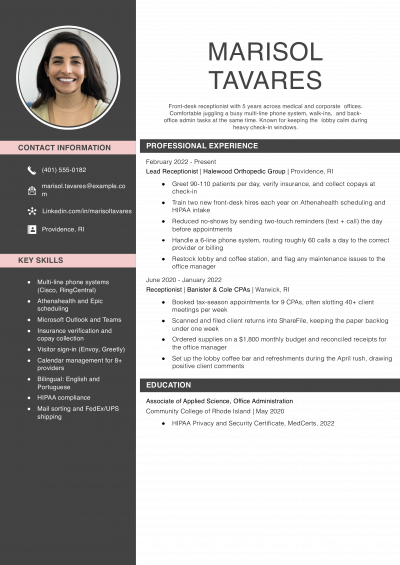
Lead with one line a generic front desk pool will not have. That might be a bilingual patient intake history, experience on a specific phone system like RingCentral or Cisco, or coverage of a 200-visitor…

Featured Example - Office Coordinator
Office Coordinator Resume Examples
Andrew Stoner By: Andrew Stoner

Your summary should lead with a number that shows the office’s scale. Name the headcount you support, the number of sites you coordinate, or the vendor accounts you manage. Office managers and operations directors read…

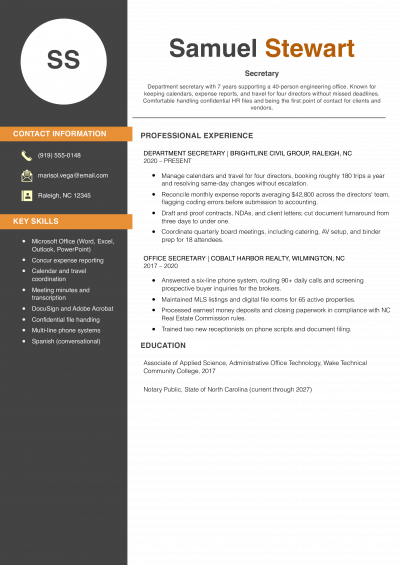
Featured Example
Secretary Resume Examples
Andrew Stoner By: Andrew Stoner

Add a single line at the top that an office manager cannot guess from the words ‘secretary’ or ‘administrative assistant.’ Name the executive level you support, the industry, or a software stack that signals real…

Andrew Stoner
Andrew Stoner

Executive Resume Writer and Career Coach

Andrew Stoner is an executive career coach and resume writer with 17 years of experience as a hiring manager and operations leader at two Fortune 500 Financial Services companies, and as the career services director at two major university business schools.

Administrative Clerk Resume Example

Office Clerk Resume

Customize this template in our builder in under 10 minutes.

Build my resume
Excellent Excellent
4.7 STARS on 4.7 STAR
flash image Get the 2x more job offers*
ResumeTemplates.com LOGO
Trustpilot

Elevate your career with insider job advice and expert resume templates.

Build Your Resume
  • AI Resume Builder
  • Resume Builder App
  • Action Verbs, Power Words, and Strong Synonyms to Use on Your Resume
  • How Long Should a Resume Be?
  • How To Make a Resume
  • Key Skills Examples for Your Resume
Essential Resume Guides
  • Are Resume Templates a Good Idea?
  • How to List Work Experience on a Resume
  • How To Fill Out a Resume Template
  • How To Use a Resume Template for Free
About Resume Templates
  • About Us
  • Contact Us
  • Privacy Policy
  • Terms of Service
  • Do Not Sell or Share

© 2026 Resumetemplates.com All rights reserved.