Tip !

A live portfolio link at the top of the header, shipped project outcomes tied to conversion or engagement metrics, and a named design system stack are what separate the Web Designer resumes that advance in the first review by design managers and creative directors from the rest.

Andrew Stoner , Executive Resume Writer and Career Coach

Web Designer Resume Examples

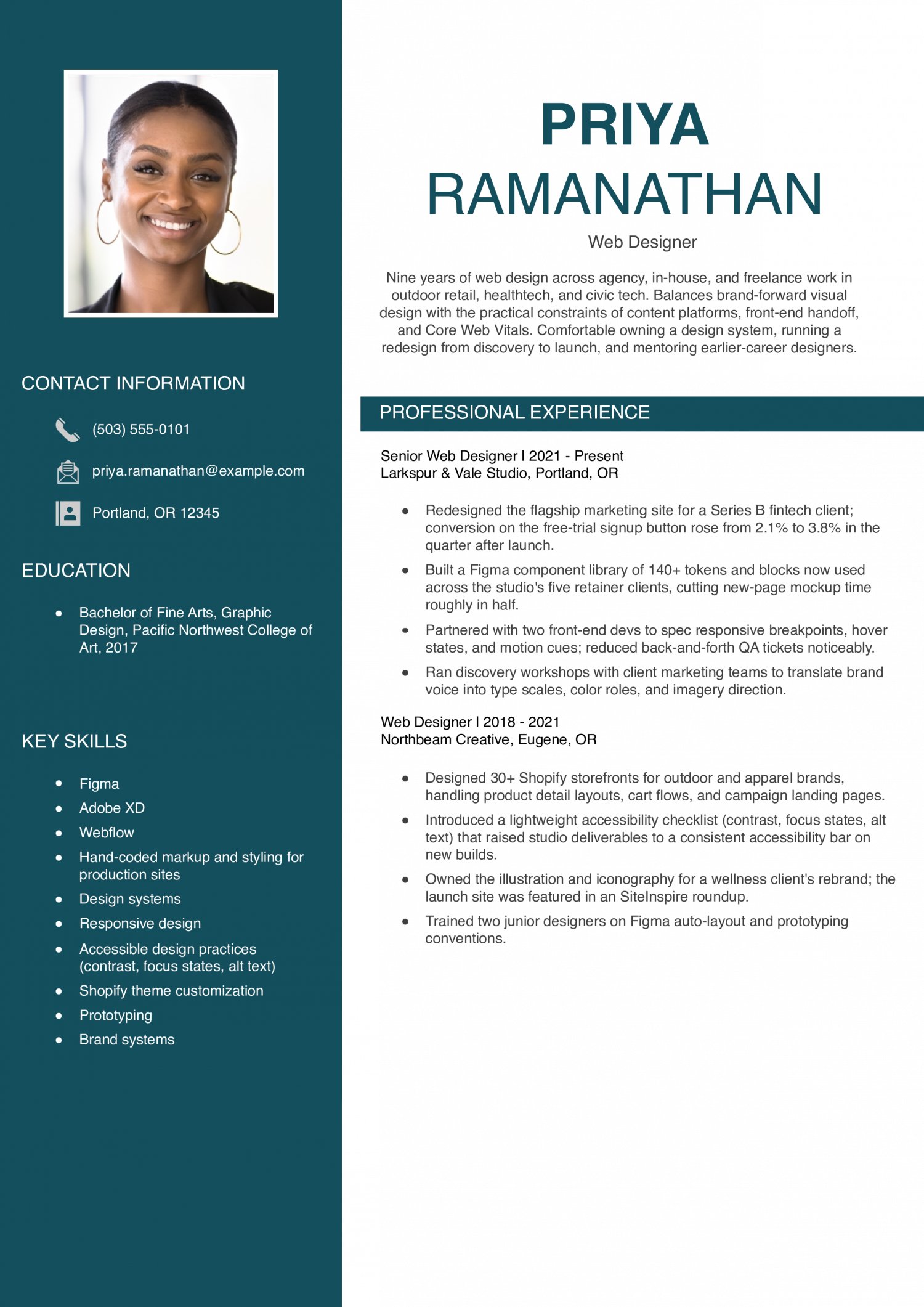
Featured Example

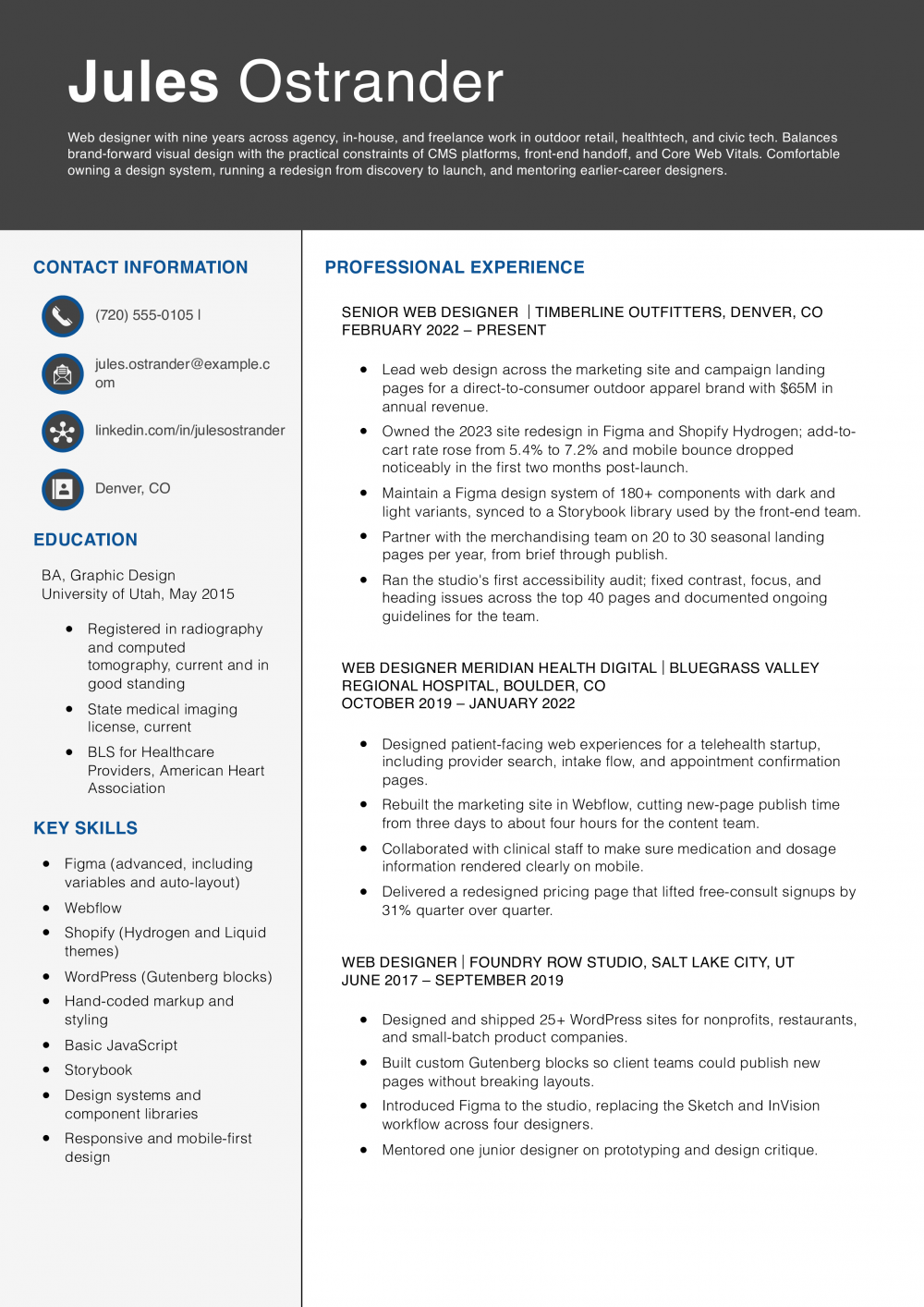
Why this resume works
  • Conversion tied to a real number: The 2.1% to 3.8% CTA lift shows the redesign moved business outcomes, not just visual polish.
  • Design system that saved time: A 140-token library that cut mockup time in half signals systems thinking, which is what senior designers get hired for.
  • Handoff and QA are part of the job: Calling out breakpoints, motion cues, and QA tickets shows this designer works well with front-end engineers instead of tossing files over the wall.

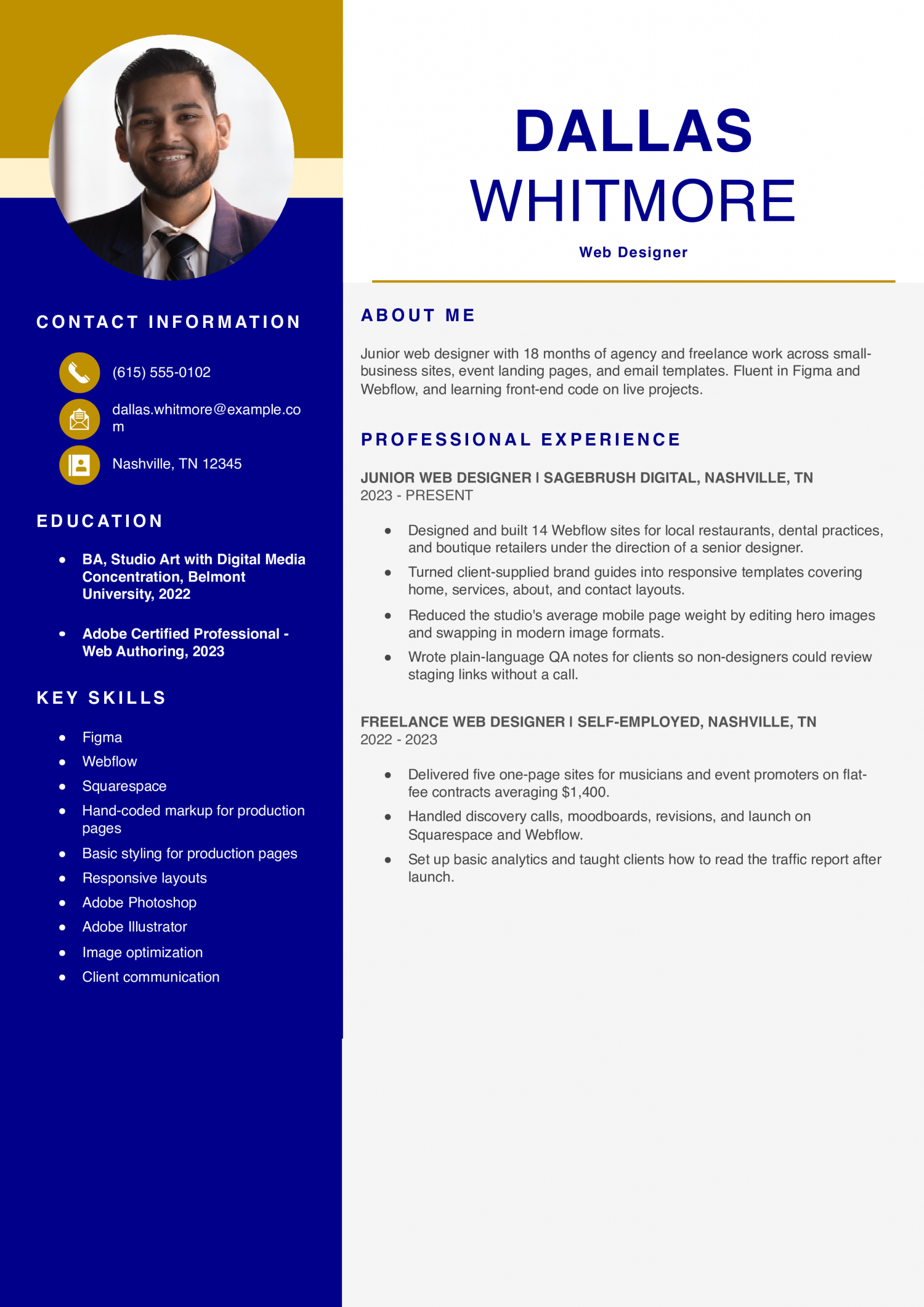
Junior Web Designer Example

A junior web designer resume shows you can build clean layouts from a senior's wireframes and turn feedback into polished screens. Show two or three portfolio projects, your tools, and any Adobe Certified Professional credential you hold.

Why this resume works
  • Real client work, not just school projects: Fourteen shipped Webflow sites and named client types show this designer has already worked through real revision cycles.
  • Shows growth into the role: The freelance year before the agency job explains where the skills came from and reads as initiative, not a gap.
  • Certification that matches the job: The Adobe Certified Professional – Web Authoring credential is a fair signal for a junior candidate without a long portfolio.

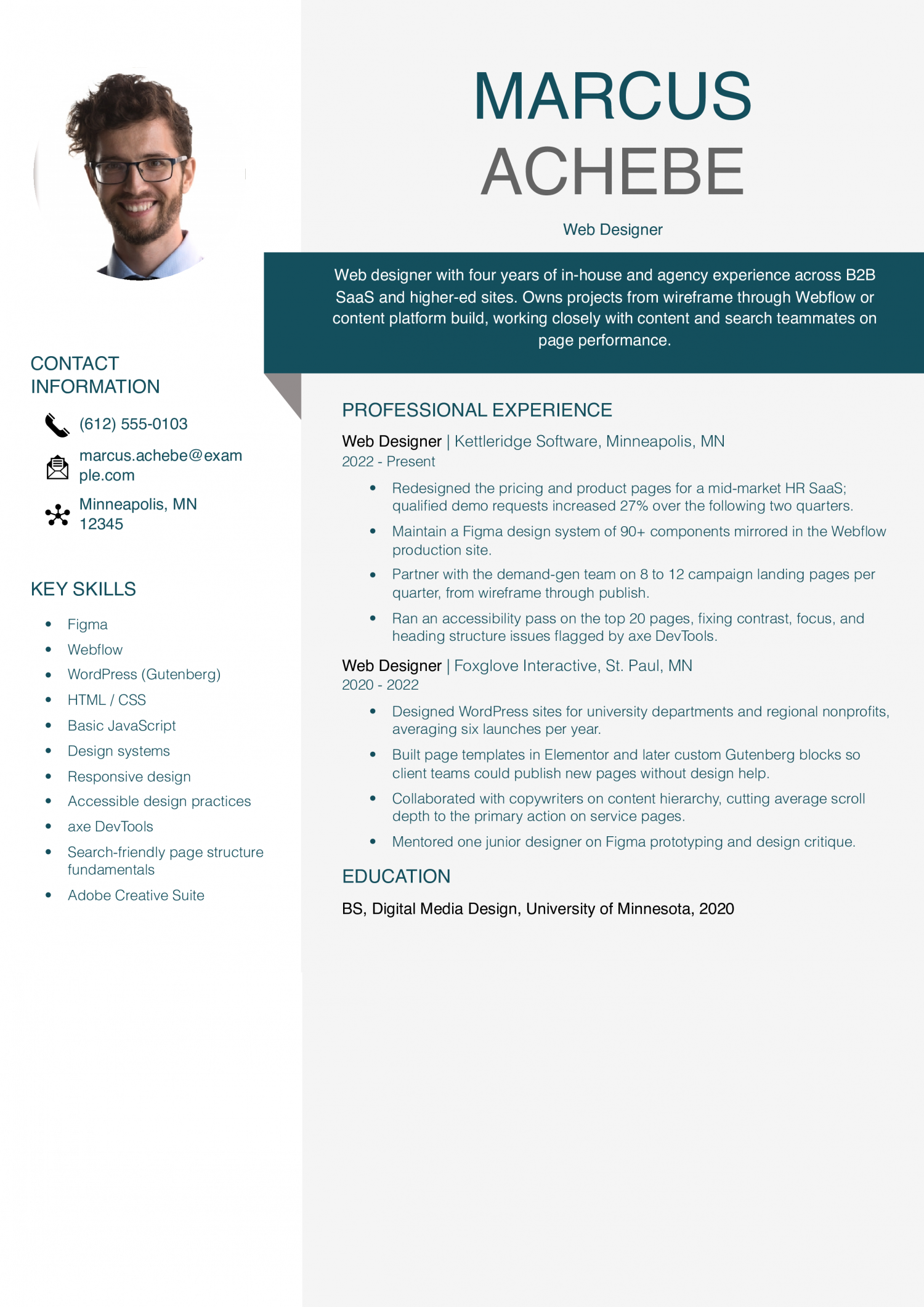
Web Designer Example

A web designer resume shows you own pages from brief to launch and partner with developers on handoff. Point design managers to shipped sites, the metrics they moved, and the design system work you contributed.

Why this resume works
  • Ties design work to demo requests: A 27% lift in qualified demos speaks the language of the marketing leaders who usually approve web-designer hires.
  • Design system plus production platform: Naming both the Figma library size and the Webflow mirror shows this designer maintains parity between design and code.
  • Accessibility work with a real tool: Mentioning axe DevTools instead of a vague ‘accessibility-minded’ claim signals the audits actually happened.

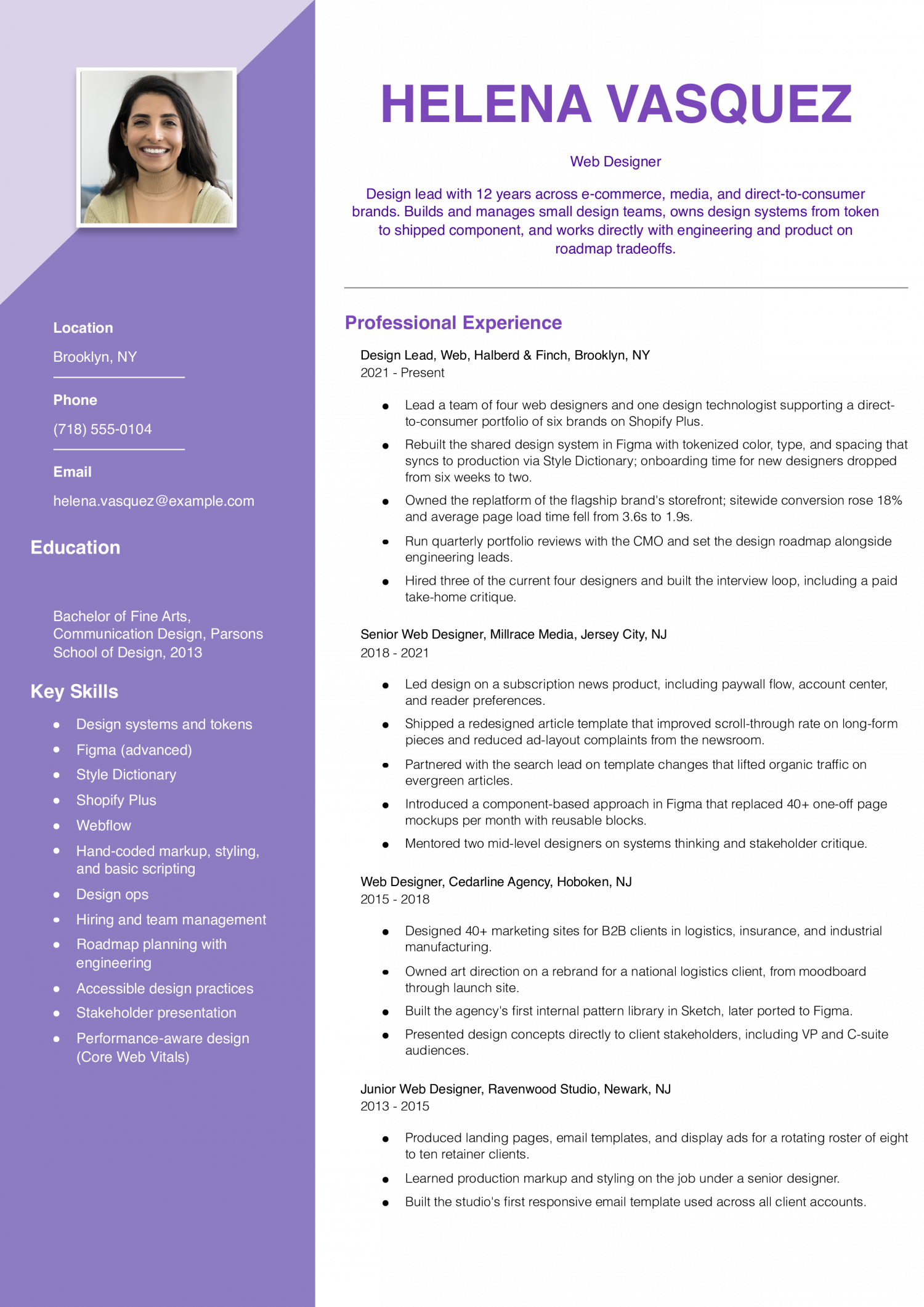
Senior Web Designer / Design Lead Example

A senior web designer resume shows you set visual direction, mentor other designers, and report to creative directors on brand. Prove it with redesigns you led and business results tied to your work.

Why this resume works
  • Manages a real team, not just projects: Naming team size, hiring three of four members, and running the interview loop tells hiring managers this is a true lead, not a senior contributor with a new title.
  • Business and performance numbers together: The 18% conversion lift paired with page load time going from 3.6s to 1.9s shows design decisions moved both revenue and Core Web Vitals.
  • Design system tied to production: Tokenized Figma synced through Style Dictionary is the kind of specific tooling that separates a lead from a strong senior designer.

How to Write a Web Designer Resume

01 Open with what a portfolio link cannot show

Start with the one signal that a design manager cannot pull from your portfolio URL alone. That could be a Figma-to-Webflow production workflow, a design system you built from scratch, or shipped work on a specific platform. It might be accessibility work, motion design in After Effects, or e-commerce theming on Shopify.

Name the framework, the platform, or the tool by its real name in your summary. A generic line like ‘creative web designer with a passion for UX’ reads as filler to creative directors. A line like ‘web designer building responsive Webflow sites for B2B SaaS clients’ reads as a match.

Lead with the specialty, then support it with your two strongest recent projects.

02 Translate design work into measurable outcomes

Design managers and creative directors scan bullets for numbers before they read verbs. A strong bullet pairs the design action with a business or usability metric you can defend. Most strong resumes name conversion lift, bounce rate change, page load time, or Lighthouse scores after a rebuild.

If your work sits upstream of analytics, use scope: number of pages redesigned, components shipped to the system, or brands supported per quarter. Bullets without any figure tend to read as duties rather than results. Round honestly and cite the source when asked.

Two or three quantified bullets per role carry more weight than six vague ones. Cut the bullets that only describe what any web designer does daily.

03 Group your work into clear design categories

Sort your bullets under four buckets so a reviewer can skim your range in ten seconds. First, visual and interaction design: wireframes, mockups, prototypes, and design system components in Figma or Sketch. Second, front-end production: markup, styling, scripting, responsive layouts, and platform builds in WordPress, Webflow, or Shopify.

Third, research and testing: usability sessions, A/B tests, heatmap review, and accessibility audits. Fourth, collaboration and handoff: developer specs, stakeholder reviews, and content partnerships with copy and marketing. Under each role, order bullets so the highest-impact category leads.

If you specialize in one bucket, say so plainly instead of padding the others. Design leaders would rather see depth in two areas than shallow claims in four.

04 Place tools and credentials on page one

Design managers and creative directors filter early on software fluency, so put a skills block near the top of page one. List your design tools first: Figma, Sketch, Adobe XD, Photoshop, and Illustrator. Then list your build stack: markup, styling, scripting, and the platforms you ship in.

Add your prototyping, motion, and handoff tools last: Principle, After Effects, and Zeplin. If you hold the Adobe Certified Professional – Web Authoring, list it in a short credentials line under your name with the issuer and year. A live portfolio URL belongs in the header next to your email.

Reviewers click the portfolio before they finish reading the summary, so treat that link as your most important credential.

05 Close with education, portfolio, and case study links

Wrap the resume with the sections a reviewer expects to find after your experience. List your degree, bootcamp, or design program with the institution and completion year. If you are early in your career, add relevant coursework in interaction design, typography, or front-end development.

Below education, place a short projects section with two or three case studies. For each, give the client or product, your role, the tools used, and one measurable outcome in a single line. Link each case study to a live page in your portfolio rather than a PDF.

Skip hobbies, references on request, and stock objective statements. If you are shifting from print, marketing, or UX research, add a one-line transition note in your summary.

Design managers and creative directors scan dozens of web designer resumes a week. The ones they shortlist name the tools and the design outcomes behind them. Both groups weigh hard skills first to confirm you can build the work.

Figma fluency or responsive design proves you can ship without a long ramp. Soft skills like collaboration then decide who moves to a portfolio review. A designer who lists user research alongside cross-functional work reads as a team fit.

The hard list shows what the ATS parser looks for in the keyword scan. The soft list shows what the human reader looks for once you clear that gate. Match every hard skill you claim against the exact wording in the target job posting.

Mirror the phrasing when the posting says Figma or Adobe XD by name. Treat each soft skill as a claim you owe evidence for in your bullets. Pair collaboration with a bullet naming the engineers or writers you worked beside.

Soft Skills AI-estimated %
Client collaboration 66%
Creative problem-solving 53%
Feedback integration 43%
Cross-functional teamwork 35%
Deadline management 31%

And here are the top hard skills showing up most often.

Hard Skills AI-estimated %
Responsive web design 73%
UI layout design 68%
Wireframe prototyping 46%
Accessibility compliance 35%
Design system development 33%

Skill names and rankings come from an AI model grounded in U.S. Department of Labor occupation data for web designers, not from a count of web designers’ resumes built on ResumeTemplates.com.

Must Have on a Web Designer Resume

Before a web designer resume gets a closer read, hiring teams check for a short list of essentials.

Niche Keywords for ATS Checkers

Design managers and creative directors scan for the tools you touch. They want proof you work across the full build. Sort your keywords into buckets by the kind of work each one covers. The first row shows the design software you draft in. The second covers the front-end code you hand off or ship. The third names the content platforms clients ask about. The fourth points to responsive and accessibility work. The fifth flags research and testing habits on live sites. Mirror the exact terms from the job post when they fit your record. Keep the capitals a vendor uses on its own product. Trim any tool you have not used in two years.

Niche Keywords ATS scans for
Design tools Figma, Adobe XD, Sketch
Front-end code HTML5, CSS3, JavaScript
CMS platforms WordPress, Webflow, Shopify
Responsive and accessibility mobile-first design, accessible color contrast, cross-browser testing
UX research wireframing, A/B testing, Google Analytics

AI Skills to Add

AI use on a Web Designer resume can go three ways. You can lead with ‘AI-powered designer,’ which design managers and creative directors screen out fast. You can leave it off and answer the tool question live in the interview. Or you can describe the workflow as it actually runs on your projects. The third is what design managers and creative directors can validate. Name the tool, the step where it enters your process, and the review you run before a file ships. Generative image tools now touch moodboards, hero art, and first-pass component copy. Reviewers want to see judgment, not prompt volume, on the page.

What AI is actually changing for this role
Moodboards and concepts

Image generators now produce first-pass direction, so your value shifts to curation, art direction, and brand fit.

Component copy

Draft microcopy for buttons, empty states, and tooltips comes from LLMs, then you edit for voice and length.

Layout iteration

Design tools suggest layout variants and auto-layout fixes, so you spend more time on hierarchy and less on nudging pixels.

Handoff and specs

AI drafts alt text, redlines, and component docs, and you verify accuracy before the file reaches engineering.

AI tools to name
  • Figma AI: Use for layer renaming, auto-layout suggestions, and first-draft component variants inside existing design files.
  • Midjourney: Use for moodboard exploration and hero imagery concepts, then art-direct final assets with a photographer or illustrator.
How to phrase AI on your resume
Do
  • Name the tool and the step it enters
  • Say who reviews the output before ship
Skip
  • AI-powered designer or AI-first creative
  • Prompt engineering as a standalone skill

Portfolio Strategy

Your portfolio carries more weight than your resume bullets. Design managers and creative directors open the link before they read your work history. Pick a platform that shows the work at full fidelity and loads fast on a phone.

#1 overall Personal domain on Webflow

Full control over layout, type, and interaction detail.

Best for speed Framer site

Ship a clean case study page in a weekend.

Best for range Squarespace

Good default typography if you do not want to code.

Best for shots Dribbble

Use as a feeder, not as your main link.

Best for process Notion or Read.cv

Long-form case studies with problem, decisions, and outcome.

Lead with three to five case studies, not a wall of thumbnails. Each one should name the client, the brief, and what you decided. Show the final screens at real device sizes, and include one before-and-after where you can.

Put your own domain at the top of the resume, next to your email. If you hold the Adobe Certified Professional – Web Authoring credential, list it in a short credentials line under your name.

Web Design Credentials Worth Listing

Design managers and creative directors read this list as a map of where your work is heading. The certifications below tell them which tools, platforms, or output types you have invested in. They are not the required minimum. They are the signal of where you want your next role to go. A junior designer with a tool certification reads as ready for production work. A mid-level designer with a specialty credential reads as ready to own that area of the site. List the credential name, the issuing body, and the year you earned it. Put the year in progress if you are still testing.

  • Adobe Certified Professional - Web Authoring: Adobe issues this credential, and studios often ask for it when the role centers on Dreamweaver and hand-built pages.

Latest BLS Statistics for Web Designers

The Web Designer pay curve is wide at the top and long at the bottom. The 90th percentile earns roughly double what the median earns. The 10th percentile sits close to half of the median.

That spread tells you the market rewards a specific stack, a named industry, and a portfolio of shipped work far more than years on the job. National employment sits at a moderate level, so a strong book of work matters more than a common title. Build the resume around the sites you shipped, the tools you own, and the industries you have designed for.

Lead with the portfolio link and the two or three projects that match the posting.

$104,000 National median annual
$117,490 National mean annual
$53,750 10th percentile
$201,550 90th percentile
113,330 Web Designers in the U.S.
Where you stand

Below median

$53,750 to $104,000 Show a live portfolio URL and name the CMS or framework you build in.

Above median

$104,000 to $201,550 Above the median, show the shipped sites you owned end to end and the design system you built.

Top 10%

$201,550+ In the top 10%, lead with lead-designer scope, the teams you guided, and named brand or agency clients.

Top-paying states

# State Median Annual
1 California $136,110
2 Washington $130,480
3 New York $120,990
4 Massachusetts $113,540
5 New Hampshire $111,150
6 District of Columbia $107,650
7 Rhode Island $105,990
8 Pennsylvania $104,160
9 Georgia $103,810
10 Texas $102,650

Highest-employment states

# State Workers Median
1 California 27,090 $136,110
2 New York 16,560 $120,990
3 Washington 11,580 $130,480
4 Texas 5,910 $102,650
5 Florida 4,620 $77,730


6% projected growthJob outlook, 2025-2035

Source: U.S. Bureau of Labor Statistics, Employment Projections, 2025-2035. View on bls.gov
Source: U.S. Bureau of Labor Statistics, OEWS May 2025 release (SOC 15-1255). View on bls.gov
Written by professional resume writers and loved by hiring managers

Resume Templates offers HR approved resume templates to help you create a professional resume in minutes. Choose from several template options and even pre-populate a resume from your profile.

Frequently Asked Questions

How should you describe web design work on a resume?

Name the site or product, your role on it, and the design problem you were handed. Follow that with the outcome in a number a reader can check: conversion lift, bounce rate drop, or task completion time. Design managers and creative directors read the outcome before they open the portfolio link.

How do you list responsive web design on a resume?

Put it in the skills section as one line, then prove it in a bullet under a real project. Name the breakpoints you designed for and the framework you built the layouts in, such as Tailwind or Bootstrap. A skills line without a matching project bullet reads as filler to a design manager.

How do you put freelance web design on a resume?

List it as its own role with a company name, either your studio name or Freelance Web Designer, and the date range. Under it, write two or three client engagements the way you would write staff bullets, with the client, the deliverable, and the outcome. Gaps between contracts read as normal on a freelance line and do not need explanation.

Is a web designer resume viewed on phone or desktop?

Recruiters open it on desktop inside an applicant tracking system, and design managers often re-read it on a phone before an interview. Design for the desktop PDF first, then check that headings, dates, and the portfolio link stay readable at phone width. A two-column layout that hides dates on a narrow screen is the most common failure.

Should you use a chronological format for a web designer resume?

Yes, reverse chronological is the safe pick because design managers want to see where you worked most recently and for how long. A functional resume that hides dates behind grouped skills reads as a gap you are covering up. Keep the format standard and let the portfolio carry the visual identity.

How do you list web design projects when you have no agency job yet?

Build a Projects section directly under Experience and give each entry the same shape as a job: title, context, and outcome. Real client work counts even if unpaid, and so does a redesign of a live site you shipped for a nonprofit or a local business. Two strong projects with numbers beat six class briefs with screenshots.

Should you list AI design tools on a web designer resume in 2026?

Yes, name the specific tools you actually use in production, such as Figma AI, Midjourney for moodboards, or a copy assistant for microcopy drafts. Put them in the tools section, not the skills section, and say what you use each one for in one bullet under a project. Design managers and creative directors are wary of vague AI claims and read for the workflow behind the name.

What's the best resume template for a web designer?

For a web designer, an ATS-friendly template is the safest pick, because it puts your certifications and experience where a hiring manager scans first. A basic template is a solid alternative. Whichever you choose, keep the formatting clean and easy to parse: clear section headings, a standard font, and no graphics a parser can choke on.

Rate this article

Web Designer Resume

Average Rating

4.8/5 stars with 238 reviews

You have given 0 Star(s)
4.8/5 stars with 238 reviews
Andrew Stoner

Executive Resume Writer and Career Coach

Andrew Stoner is an executive career coach and resume writer with 17 years of experience as a hiring manager and operations leader at two Fortune 500 Financial Services companies, and as the career services director at two major university business schools.